Six-plus years shipping production software, mostly immersive: AR and VR for Meta Quest, Apple Vision Pro and HoloLens, Unity tooling, WebGL configurators, and AI products with their backends. Lead developer on ten-plus XR projects in gaming, medical, government and web3 totaling $1.5M+, for Anheuser-Busch, ForeverLawn, ShoreMaster, Bioness, Boston Celtics and Björk. Through XRTech I build end to end: headset app, API, auth, billing, and hardware when needed.
Headset experiences, training simulators, and the frame budget
What if the interface was the room you're standing in?
The headset on the shelf stands in for the biggest slice of the work in here: VR and mixed reality built in Unity for Meta Quest, Apple Vision Pro, HTC Vive Focus and HoloLens.
RehearsalXR
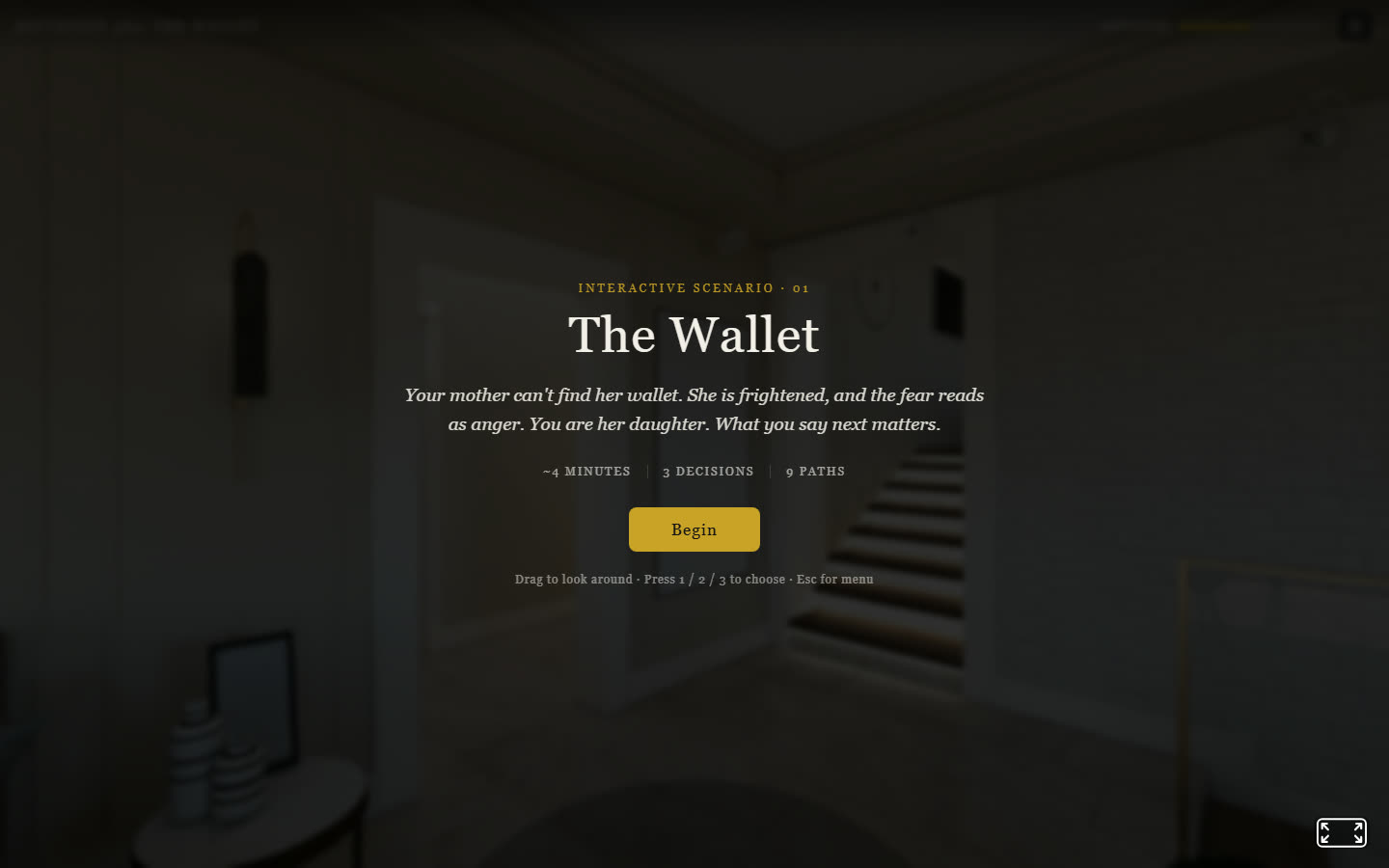
RehearsalXR is XRTech's simulation platform for rehearsing conversations and procedures that are too expensive, too rare or too sensitive to practice for real. A trainee stands in a believable environment, talks to photorealistic characters, and works through a branching scenario where each choice changes what happens next.
The public demo is a caregiving scenario called The Wallet. Your mother cannot find her wallet, she is frightened, and the fear is coming out as anger. Three decisions, nine paths, about four minutes. It runs in a browser, so it can be tried without a headset at all.
The Wallet, RehearsalXR's browser demo: three decisions, nine paths
What makes the platform reusable is that scenarios are authored as data rather than code: a graph of conversational beats, each with its line, its environment and its branches. The same engine has been pointed at veteran peer support and suicide prevention, aviation pre-flight inspection, automotive diagnostics, warehouse and forklift certification, clinical knowledge checks, and conversational language learning. Environments are full 360 captures, so a customer can drop in a photo of their own workplace and train people in the room they actually work in.
One content base runs on Quest, desktop, phone and the web. The platform detects the device and offers the matching controls: controller rays in VR, click on desktop, tap on mobile. Every session logs the choices made and any quiz results, so a trainee's run can be reviewed afterwards rather than taken on trust.
What's in this pile
Joshua Tree Music Festival, stereoscopic 360 sets from six artists, shipped on the Meta Quest store for Quest and Apple Vision Pro
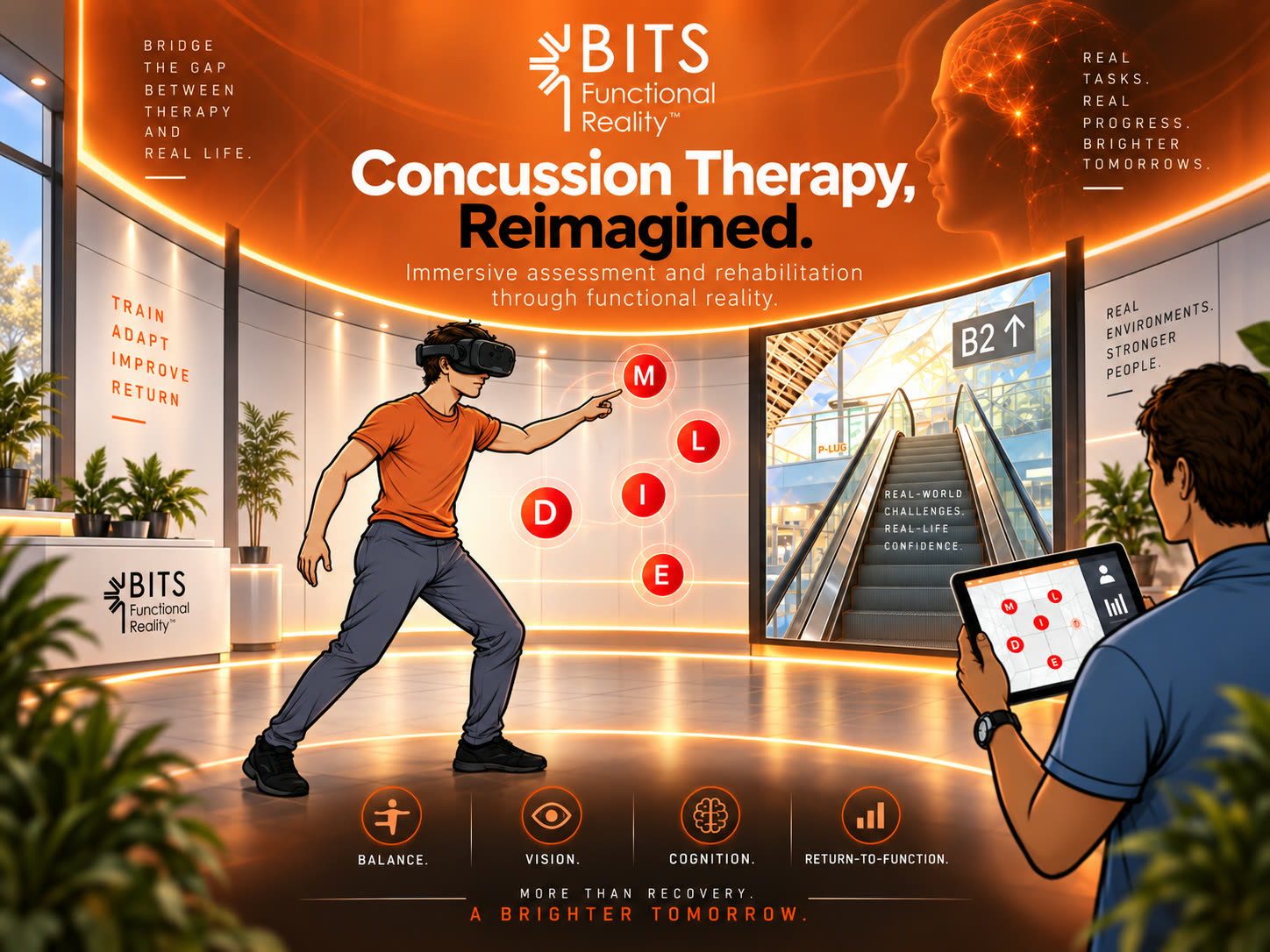
VR Concussion Therapy, 25+ rehabilitation modules on the B.I.T.S. platform, with a clinician's tablet driving the headset
Björk's Vulnicura VR album, launched on the Meta Quest store with PulseJet Studios
Battle Tank Simulator, an Oculus Rift project with hand tracking
The Process
Every one of these is the same set of problems wearing different clothes. Frame budget first: a Quest is a phone strapped to your face, and a scene that runs at 90fps on a desktop will make people sick on standalone hardware. Then interaction, where hands, controllers, eye tracking and gaze each give a different right answer per device and per user. Then comfort, which is not a polish item but a design constraint you build around from the first prototype.
The rest is Blender: reducing, re-baking and re-lighting art until it renders at frame rate without looking like a compromise.
Outcome
Shipping to Quest, Vision Pro, Vive Focus and HoloLens in the same few years has been the best possible education in what these devices are actually for, and in how differently each of them wants to be talked to.
Not everything needs a headset. The computer on the desk is the pile of work that ships as a web app, a desktop app, a tool or a script.
Products that are live
Two of these are running businesses rather than demos.
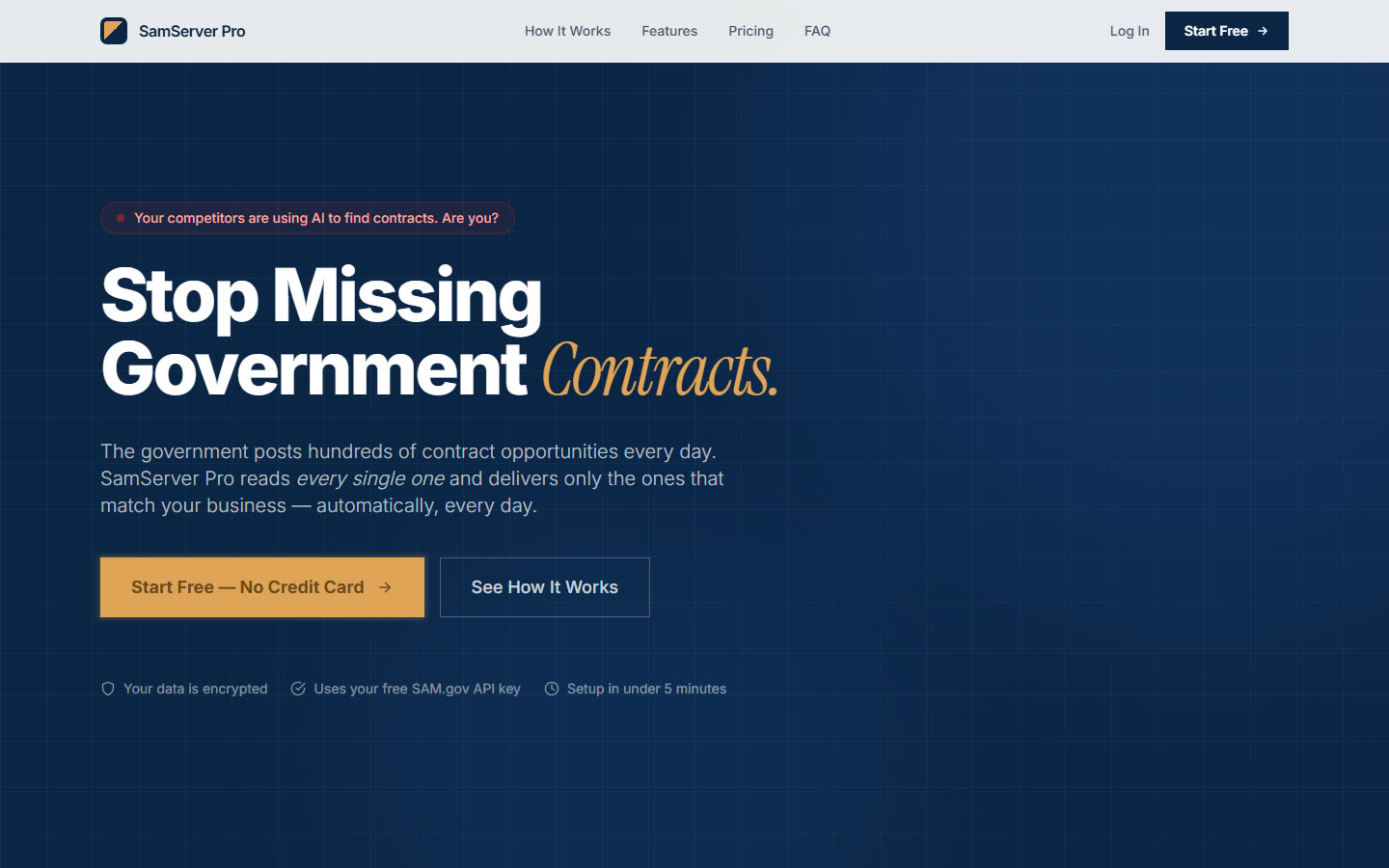
SamServer Pro, live at samsearch.xrtech.devQlaw, live at qlawai.com
SamServer Pro is an AI bid-discovery tool for small federal contractors. You build a company profile once, and it watches SAM.gov, Grants.gov and NSF on a schedule, scores every opportunity against that profile from 0 to 100, and explains in plain English why something fits or does not. It surfaces what a human capture analyst would flag: incumbent and bridge signals, set-aside eligibility mismatches, a hardware requirement landing on a services firm. The explanation is the product. Free government search is keyword-literal and cannot tell you whether a notice is worth your afternoon, and the tools that can are priced for capture teams a five-person contractor does not have.
It also exposes a REST API and an MCP server, so a user can point their own AI client at their own scored pipeline and ask it questions directly.
Qlaw is an inference platform serving Qwen models on IBM infrastructure, built for people running autonomous agents. The lineup splits along what agent work actually costs: a 32B reasoning model with tool calling and a multimodal model for images and PDFs on the paid tier, and on the free tier an 80B code specialist with a 100K context window alongside a 1.7B model with unlimited tokens on every plan. Agents burn tokens in a way that chat does not, and metering them by the sip is what stops people building.
Tools and packages
ISP Watchdog is a free, open-source desktop app that measures what an internet connection actually delivers, scores the evidence against what you are paying for, and drafts the complaint email. Written in TypeScript.
Manual WebRTC for Unity connects two Unity applications directly for live video with no signaling server at all. SDP and ICE candidates are exchanged by copy and paste, which is impractical in production and exactly right for seeing what WebRTC needs before a library hides it from you. It works on a local network and across the public internet, and it extends to audio, data channels and TURN relay.
Pico SDK on Windows is the toolchain writeup and template that gets C onto a Raspberry Pi Pico without an IDE in the way. More about that on the electronics page.
What's in this pile
ShoreMaster Dockbuilder, a Unity WebGL configurator with 40+ components and a snapping system, live on ShoreMaster's site
EventShop, cross-platform AR ticketing on iOS, Android and WebGL, with runtime image targets and cloud OCR
Nanoleaf Weather Lights, a Python service that turns live weather into color on a wall of LED panels
Arcade Mini-Games, a flight simulator and an arcade catcher, both built in a week
Drone Photogrammetry, turning drone captures into game-ready 3D assets, and the Blender pipeline that makes them usable
The Process
Most of the interesting decisions happen before any of it is visible. Data-driven design with ScriptableObjects, so a client can add content without a rebuild. Custom Unity editor tooling, so the person doing the work is not me. Profiling early, because a WebGL build has a memory ceiling a desktop build does not. Addressables and cloud build automation, so shipping is boring.
I have also spent enough time inside other people's legacy Unity projects to be genuinely good at it: reading unfamiliar architecture, extending it without breaking what already ships, and leaving it better documented than I found it.
Everything else
The rest lives in two places. GitHub has the code, from ESP32 firmware to Unity packages to the odd website. YouTube has the things that are easier to watch than to read.
Outcome
The web builds are the ones that surprise people. No download, no install, no app store review. A link in an email and the customer is designing a dock, or watching their ticket stub replay a game.
Neuroadaptive VR language learning, and the backend under it
What if a language app could tell you were too tired to learn, and got out of your way?
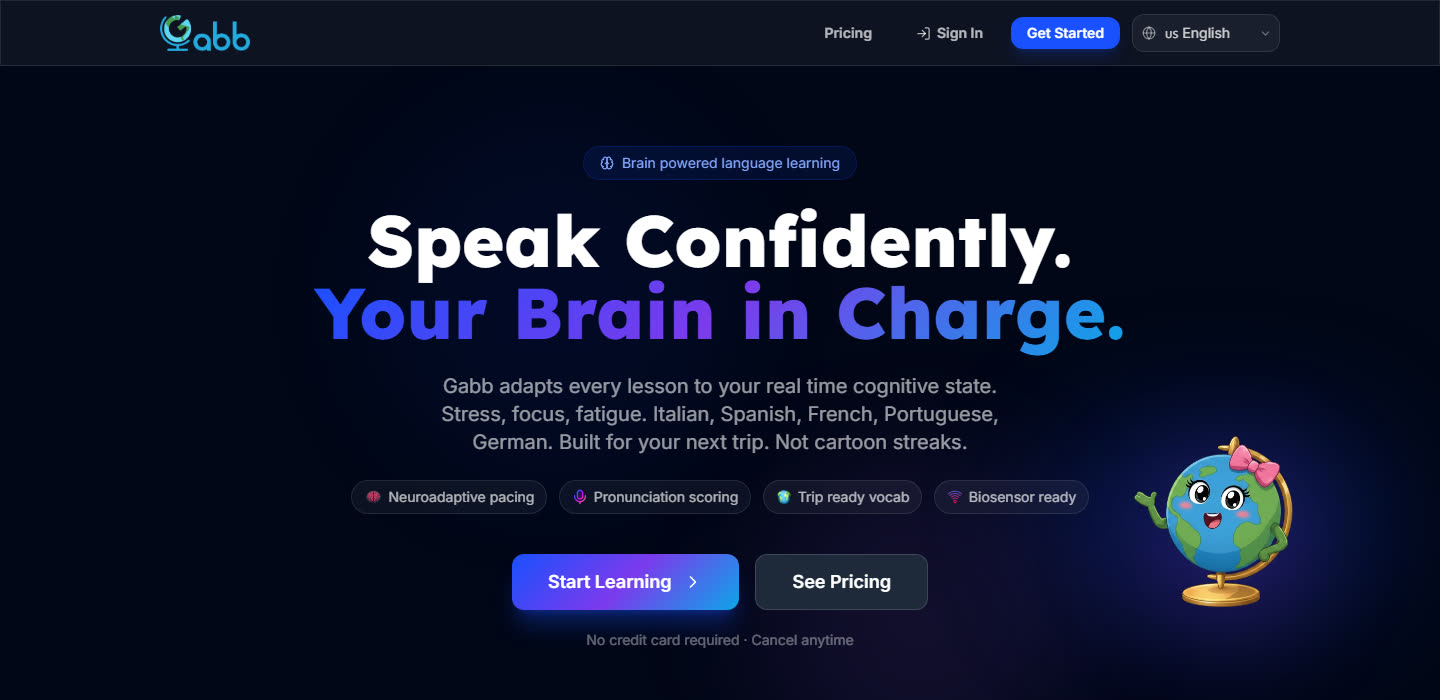
Gabb Languages: six languages, paced by the learner’s live cognitive state
Gabb is a neuroadaptive VR language platform out of UCLA, backed by Pharrell Williams, UCLA, The Clinton Foundation and Verizon. It adapts every lesson to the learner's real-time cognitive state — stress, focus, fatigue, read from biosensors rather than inferred from a streak counter. Six languages, pronunciation scored at the phoneme level, vocabulary built around the trip you are actually taking.
The founder had a working prototype he had vibe-coded himself, and no production backend under it. He found me the way people find contractors now — he asked an AI who should build it — and XRTech took the whole server side.
The Process
The brief was the part a prototype never has: real accounts, real money, real student data, and a school district's tolerance for none of it going wrong. My rule on this kind of build is to own the application logic and rent the things that carry liability — I want auditable third parties I can hold accountable for auth and payments, and learners signing in with credentials they already trust.
Auth — Clerk. Google SSO as the front door, so no password ever lands in our database. Sessions, org membership and role claims come out of Clerk and drive what a learner, a teacher or an admin can see.
Data — Supabase. Postgres with row-level security as the actual enforcement boundary, not a convention in the API layer. Learner sessions, per-word accuracy, neural profiles and class rosters, with the policies written so a teacher reaches their own roster and nothing else.
API — Render. The service layer that owns scoring, session state and the adaptive pacing logic, kept off the client where it can be read and gamed.
Billing — Stripe. Consumer tiers alongside a per-seat School plan, with entitlement checks derived from subscription state rather than stored as a flag someone can flip.
Delivery — Vercel. The web client and preview deploys, so the founder can see a branch running before it merges.
The consumer tiers, wired to Stripe. A per-seat School plan sits alongside them.
The neural profile view is where the whole idea becomes visible: eight regions — hippocampus, Broca's and Wernicke's areas, prefrontal and motor cortex, visual cortex, parietal and temporal lobes — lit by live activation as the learner works, and the same signal that drives the picture drives the difficulty.
The neural profile view: eight regions lit by live activation as the learner works
The school dashboards run on top of the same session data, banding a class into strong, steady and struggling by accuracy so a teacher sees who needs the next ten minutes.
Outcome
The platform is live and taking real sign-ups, with early traction among schools in Southern California. It is the same stack I reach for on every SaaS build — Supabase, Clerk, Render, Stripe, Vercel — and this is the clearest case for why: one engineer stood up auth, data, an API, billing and hosting for a product handling student data, and the parts most likely to end a company are run by people who do only that.
Better Patient Outcomes for Traumatic Brain Injury Recovery
What if virtual reality could help patients reclaim their daily lives after brain injury?
B.I.T.S. Functional Reality: the platform this VR suite extends
Integro partnered with rehabilitation specialists to reimagine concussion therapy with virtual and mixed reality. Building on the B.I.T.S. platform, used by 90% of the top rehab hospitals in the U.S., we extended therapy into immersive VR with over 25 customizable modules, from gamified target exercises with real-time performance tracking to optokinetic visual training and daily-life simulations. The result is therapy that is more adaptive, engaging, and clinically impactful.
The Process
I worked within a complex legacy Unity project to extend and modernize Integro's therapy platform for the HTC Vive Focus, chosen for its enterprise healthcare readiness.
A daily-life module: shopping a grocery aisle from inside the headset
Suite of experiences: over 25 therapy modules, including games, 360° videos, and daily-life simulations (grocery shopping, driving, laundry) to help patients relearn essential skills
Custom therapy games: target-finding games with deep configurability (color, character, size, quantity, timing), tracking accuracy and reaction time for patient progress reports
Tablet-to-headset communication: a companion Android tablet app, built with the FM Network asset, that lets clinicians configure sessions, monitor patients, and store results in a local database
Shader-based optokinetic therapy: a custom shader-driven skybox rendering dynamic moving grids, stripes, and patterns at adjustable speeds and colors, for optokinetic rehabilitation protocols
Accessibility & adaptability: reinterpreting 2D BITS modules into VR while accounting for motor impairments, accessibility needs, and patient comfort
By extending BITS into immersive VR, the platform delivered therapy that felt more engaging and was up to 40% more effective than conventional methods, while giving patients realistic practice in daily activities to help them adapt after brain injury.
A technician controls the VR therapy from a companion Android appA gamified target-finding exercise, with accuracy and reaction time logged for the patient's report
Outcome
This project showed how immersive VR can transform routine rehab into therapy that is engaging, adaptive, and scalable, giving patients a new path to independence after brain injury.
The first fully customizable mixed media solution for the operating room
Imaging held in the surgeon's line of sight, not on a monitor across the room
What if a surgeon never had to look away from the patient?
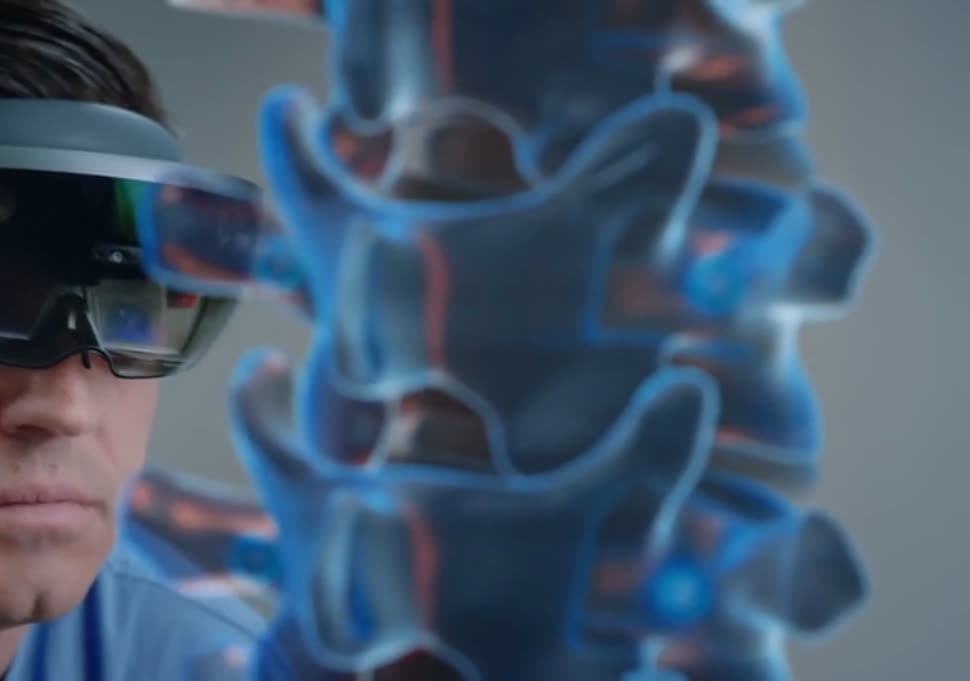
A mixed-reality operating-room digital twin, built on Microsoft HoloLens. It is the first fully customizable mixed media solution for surgical teams, keeping imaging, notes and reference material in the surgeon's field of view instead of on a monitor across the room. The headset tracks where the surgeon is already looking, so the information follows their attention instead of asking them to break it.
The Process
This was built for a surgical technology client, in a stack of HoloLens, Unity and the Mixed Reality Toolkit. Working in an operating room removes most of your usual inputs: no controllers, no touching anything, no time to fight a menu. That pushes everything onto hand gestures, gaze and voice, and onto making the gesture set small enough to stay reliable when the person using it is concentrating on something else entirely.
The other half is spatial mapping: the headset builds a mesh of the room, and content has to stay locked to real surfaces and real equipment as people move around it. Getting anchors to survive an operating theatre's lighting, reflective surfaces and constant movement was the difference between a demo and something a clinician would actually trust.
The panel system in use: phase tracker, notes, tools and reference material, all locked to the room
"Fully customizable" is the requirement that shaped the architecture: every hospital, every specialty and every surgeon wants a different layout, so the panels, sources and gesture bindings all had to be configurable rather than hard-coded.
Outcome
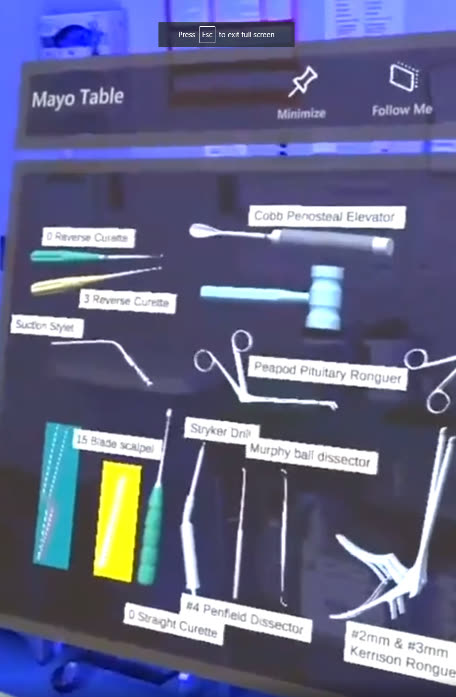
One of the configurable panels, labeling out a tray for the team
Medical XR is the clearest case I've worked on for mixed reality being genuinely better than a screen: the information goes where the attention already is. It's also the least forgiving. The bar for reliability in an operating room is nothing like the bar for a game.
A little of the press reaction
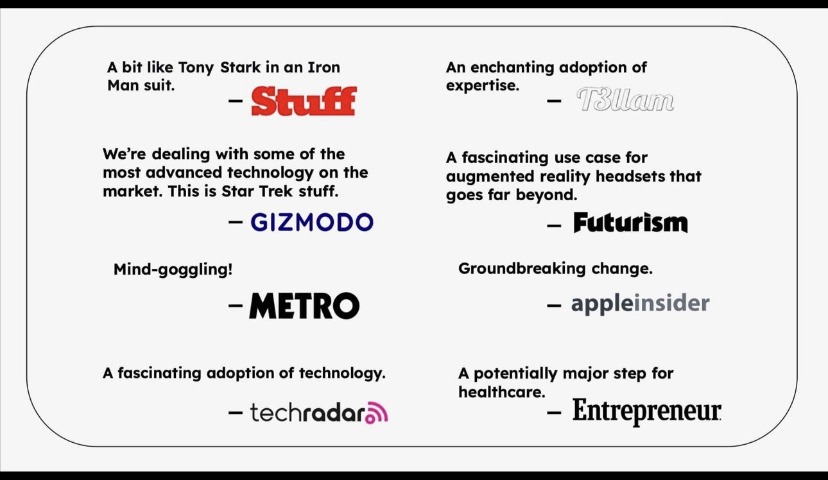
The platform was later ported to Apple Vision Pro. Press coverage followed, including features from Gizmodo, Metro, TechRadar, Futurism and others, and it was recognized among a major national magazine's picks for the year's most notable inventions.
What if you could relive the magic of the night with just a ticket stub?
The poster on the wall……and the same poster, read through the app
EventShop has partnered with sports teams like Boston Celtics, Chicago Blackhawks, Brooklyn Nets, New York Liberty, and artists like Morgan Wallen, Green Day, Ed Sheeran, Kane Brown to turn memorabilia into interactive AR experiences. By blending augmented reality with physical tickets and posters, EventShop turns stubs and prints into living windows that replay highlights, exclusive content, and immersive scenes long after the event ends.
The Process
The experience needed to run across iOS, Android, and WebGL so fans could reach the content on any device:
Cross-platform WebGL: a Unity WebGL app that runs in the browser, no download required
Runtime image targets: dynamic image-target creation, so any number of tickets and posters can each trigger their own AR scene
OCR + cloud: Azure OCR on web (native OCR on mobile) scans tickets, extracts keywords, and instantly matches highlight videos
Custom branding: a theme system and branded loading screens built with Scriptable Objects for rapid rollout of team- and artist-specific versions
A ticket stub replaying the night it belongs toHighlights matched to the stub by OCR, straight from the browser
Outcome
EventShop's AR ticketing has been featured by major franchises and artists, adding a new revenue stream and fan-engagement layer to memorabilia. By delivering a scalable, browser-based AR platform, I extended EventShop's reach from native apps into the web, making the experience instantly accessible at live events or from home. This positioned EventShop to support league-level partnerships and millions of potential fans, while lowering the barrier for first-time users, who could simply scan a ticket and watch it come alive. New tickets and posters can be added from the backend without recompiling the app, so the catalog keeps growing.
An Augmented Reality Tour of Anheuser-Busch Brewery
What if every destination tour got more interactive with hidden stories, and places?
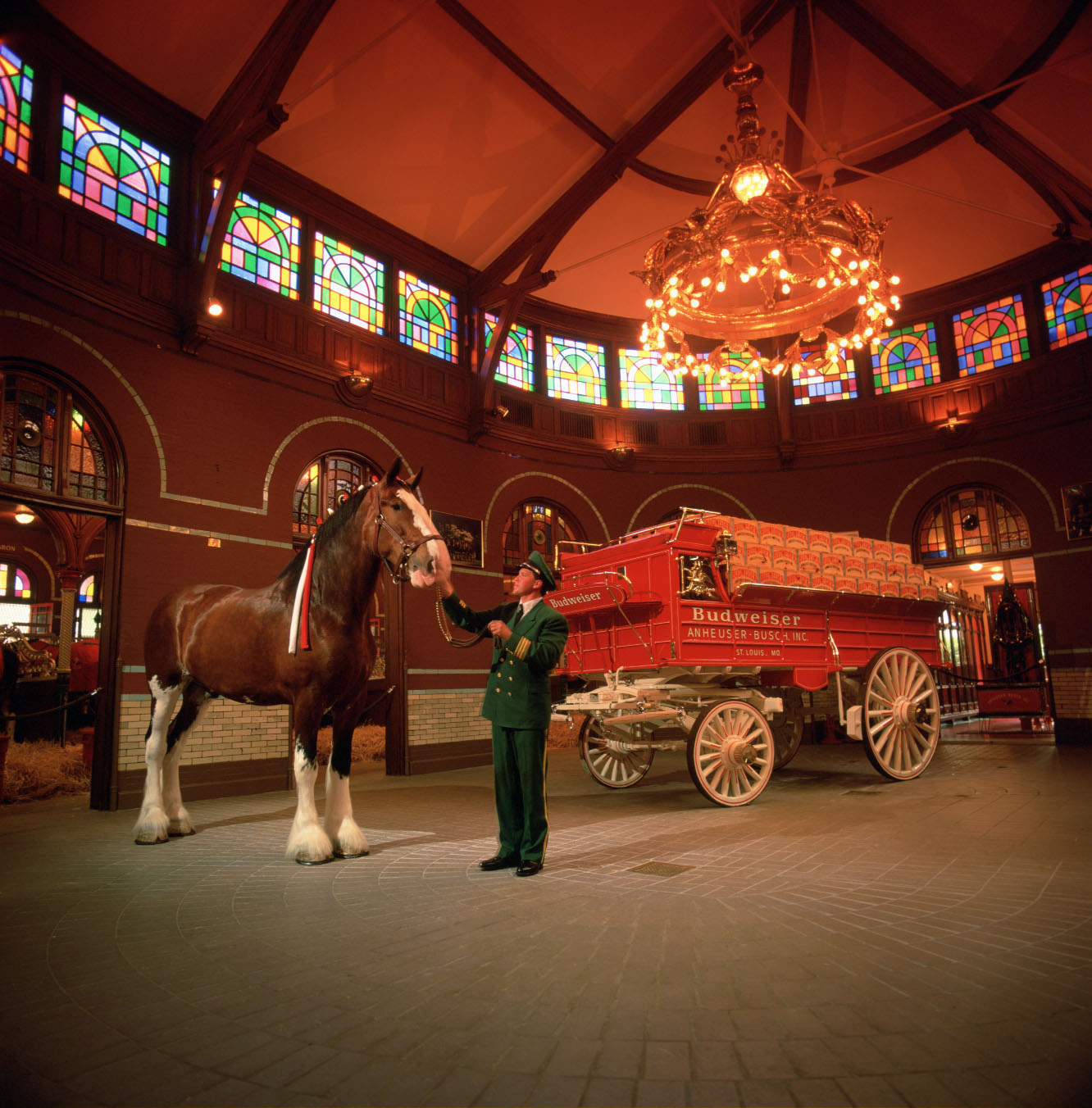
An iOS AR experience for the Anheuser-Busch Brewery Tour, built with AR Foundation and Google Cloud/Geospatial Anchors. It features photo ops with life-sized Clydesdales, a 360° brewmaster's suite, and an animated, step-by-step beer-making journey.
The Process
This tour was built to be more than a novel AR moment. It is a fully interactive, location-aware journey powered by "AR Everywhere," a proprietary AR-browser platform I worked on at Another Reality Studio. It lets clients build custom on-location experiences (tours, exhibits, scavenger hunts) in a modular, cost-effective way.
On site at the brewery, anchoring a stop to its exact location
For the brewery, we customized it into three stops, each locked precisely to its location with Google Cloud Anchors and Geospatial Anchors in Unity AR Foundation 5:
Stop 1: pose with life-sized Clydesdales and a dalmatian in the stables
Stop 2: explore a 360° photosphere of the brewmaster's exclusive suite
Stop 3: watch the entire beer-making process come alive with maps, animations, and video
The AR Everywhere tour interface
The biggest challenge was keeping everything aligned and responsive both indoors and outdoors. Cloud Anchors needed careful planning for persistence, while Geospatial Anchors tied outdoor content to exact GPS coordinates. Each scene was optimized for quick loading and smooth interaction on iPhone and iPad. For the brewing process itself, we turned a static poster into a living AR guide walking visitors through every stage from mashing to shipping, with an on-screen compass leading people from stop to stop.
Because AR Everywhere is hardware-agnostic, this same architecture can power future tours, exhibits, or brand activations without starting over.
Outcome
This project sharpened my ability to engineer location-aware AR at scale, solve complex spatial computing challenges, and deliver memorable, on-brand experiences through close creative collaboration.
Immersive Music Experiences from your Favorite Artists in Virtual Reality
What if you could stand in the middle of a music festival without leaving your living room?
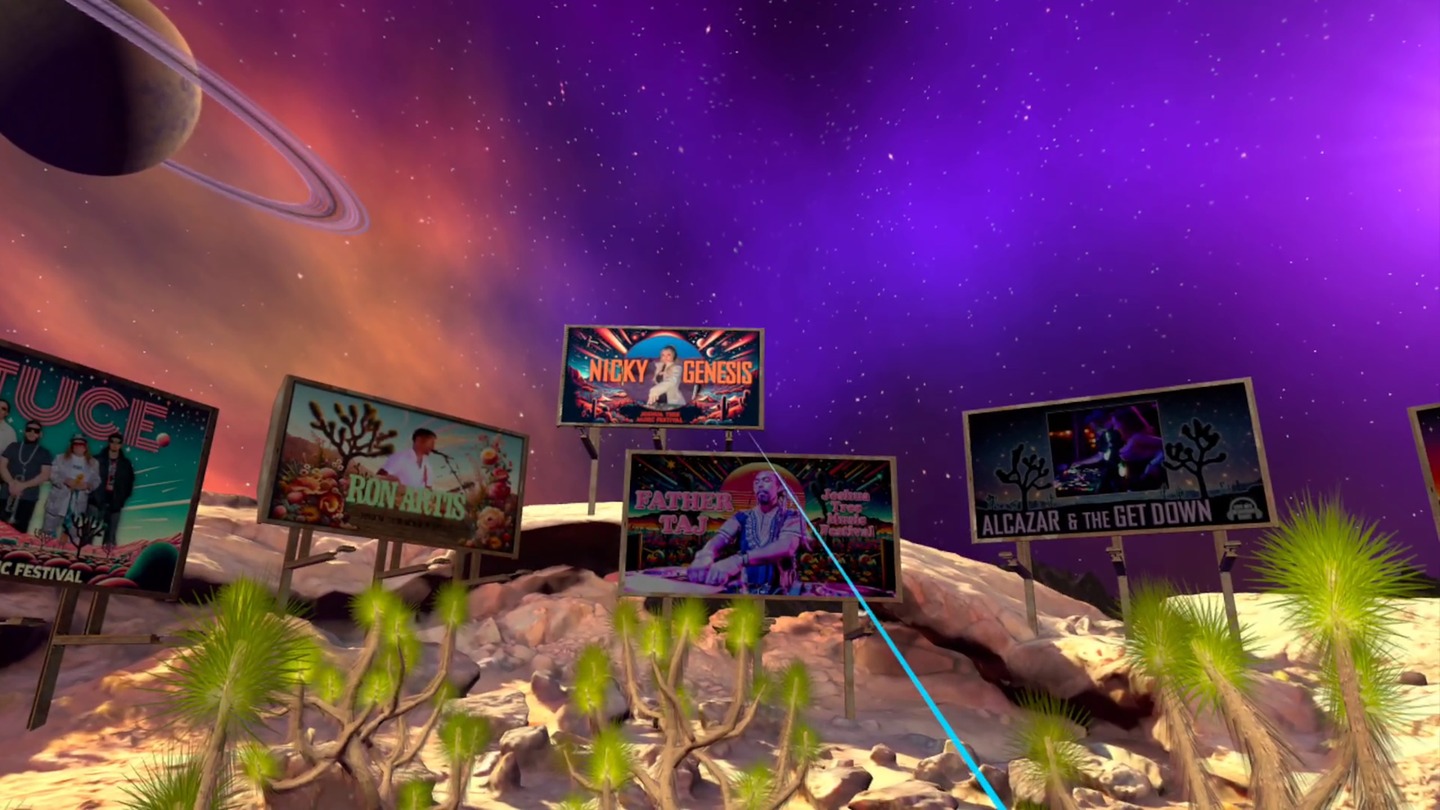
The billboard field: every artist's set is chosen from inside the world
A Unity VR experience that brings the 2023 Joshua Tree Music Festival into your headset. Built for both Meta Quest and Apple Vision Pro, it puts you inside stereoscopic 360 sets from six different artists, staged in a psychedelic, desert-inspired world.
The Process
This had to be more than 360 video playback. Leading development, I integrated stereoscopic footage with an interactive environment that evokes the real Joshua Tree, working closely with John Gearty at PulseJet Studios and leaning into what each headset does best.
The first problem was sheer volume: hundreds of gigabytes of stereoscopic footage that had to play back in real time on two very different devices. I built the compression and streaming pipeline that kept visual fidelity intact without dropping frames, backed by an Amazon S3 setup for distribution.
The collaboration left room for design changes, and I proposed several that made the final cut. The neon tie-dye skybox became a sci-fi night sky of planets and stars, which sat far better over a virtual desert. The traditional menu became a field of billboards you walk up to and choose from, so picking an artist happens in the world instead of on a panel floating in front of your face.
The Vision Pro build, running in passthrough
Apple Vision Pro was brand new and I didn't own one. Early testing ran in the simulator, with weekly builds going out for testing on real hardware. Shipping to Quest and Vision Pro at once meant maintaining two codebases, each tuned to its own architecture and interaction model: hand and eye tracking on one, controllers on the other.
Each artist got their own poster. I used AI tools to concept the artwork, then handed those concepts to traditional artists who brought the final pieces to life. They are the same posters you see on the billboards in the desert.
Nicky GenesisDiggin Dirt
Outcome
The Joshua Tree Music Festival shipped on the Meta Quest store, and the project pushed me to adapt fast to hardware that barely existed yet, solve a genuinely hard video pipeline problem, and design inside someone else's creative vision.
What if artificial turf installation could be measured and visualized instantly on site?
ForeverLawn is a national leader in synthetic turf, serving clients from backyards to Disney and ESPN. They needed a tool to help their dealer network work smarter, so I built an AR app that lets reps measure areas with LiDAR, preview turf in real time, and generate professional estimates on site.
The Process
This app had to be iOS-only, built around the iPhone's LiDAR sensor for accurate, high-performance measurements and visualizations.
AR area measurement: users drop AR anchors at corner points; when closed, the polygon fills with a realistic turf shader. Validated against Apple's own Measure app and Polycam, it holds over 98% accuracy even on large spaces like basketball courts.
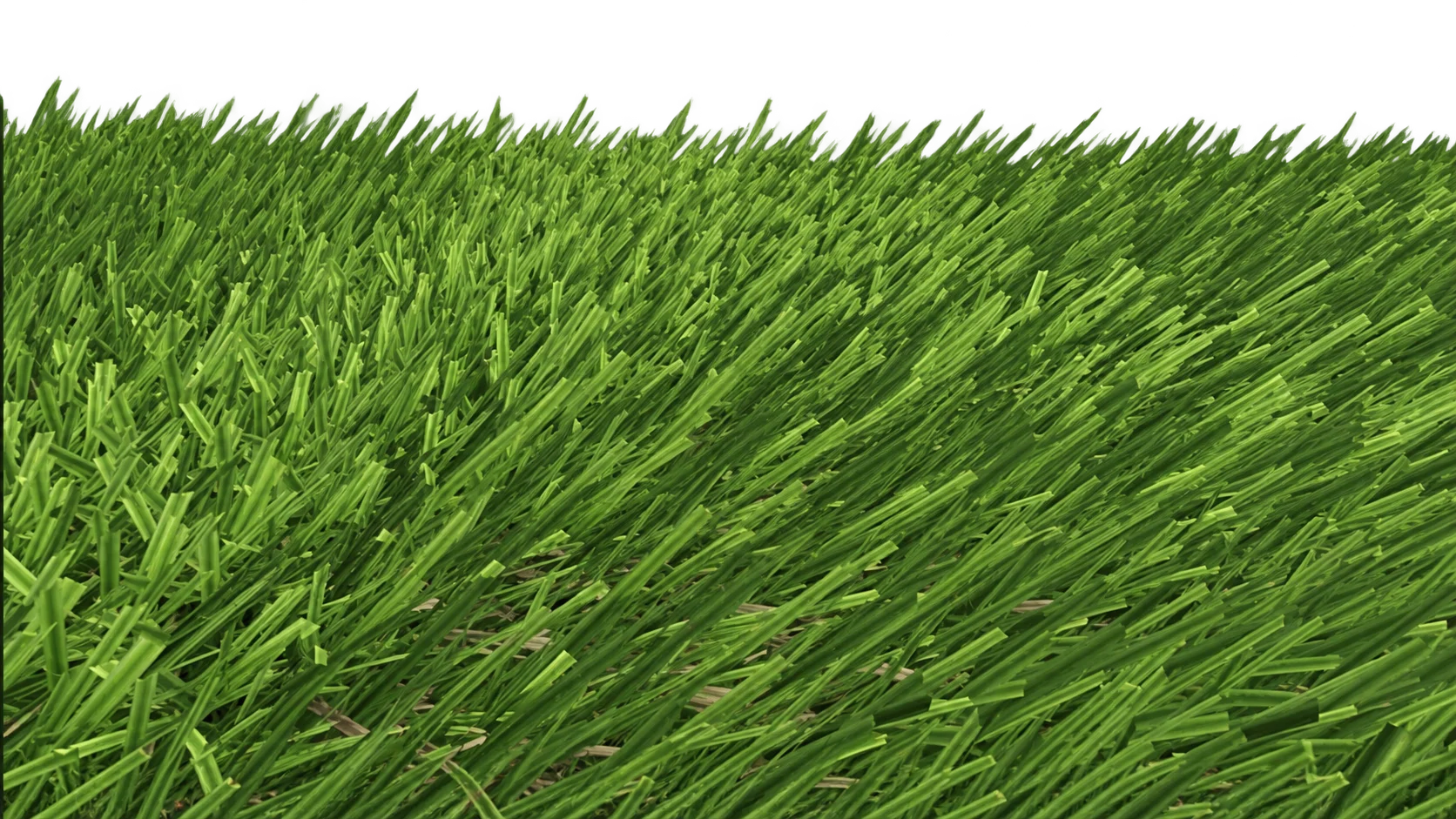
High-performance turf simulation: the turf material was GPU-optimized to render thousands of blades of grass in real time, keeping smooth framerates from small yards to full sports fields
Custom PDF export: a native iOS plugin generates templated PDF reports embedding area data and preview images, which reps can instantly email or share via NativeShare
Advanced tools: hole-cutting, point saving for future edits, and drift correction for reliable measurements over long sessions
A close-up of our digital turf
Outcome
This project sharpened my ability to engineer location-aware AR at scale, solve complex spatial computing challenges, and deliver memorable, on-brand experiences through close creative collaboration.
What if customers could design their dream dock right in their browser?
ShoreMaster, a leading U.S. dock and boat lift supplier since 1972, needed a way for customers to explore designs before purchase. We built the Dockbuilder WebGL app, with 40+ components, 9 deck styles and a virtual lake, so users can drag, snap and visualize docks in real time, boosting sales and reducing returns.
The Process
The Dockbuilder was built as a browser-based WebGL app in Unity, giving users a simple but powerful way to design docks online.
Users can visualize custom options before ordering
Accurate 3D modeling: 40+ ShoreMaster dock components recreated in Blender, scaled precisely to real-world dimensions across 9 deck styles
Custom snapping system: ramps, docks and lifts connect the way the real modular hardware does
Virtual lake environment: an interactive water scene where users can experiment with layouts and visualize docks in context
Scalability: with thousands of possible configurations, the system had to stay performant and intuitive even with complex designs
Outcome
Forty-plus components, nine deck styles, snapping together like the real thing
The Dockbuilder has become a featured tool on ShoreMaster's website, used by hundreds of customers nationwide. By letting users design and preview their docks online, the app increased sales, reduced returns, and positioned ShoreMaster as an innovator in the waterfront industry.
What if the revenue of local small businesses could be boosted through an AR app?
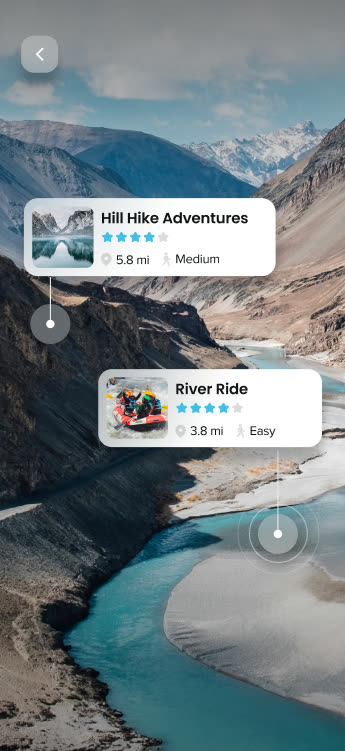
The AR view of Ouray, Colorado
Together with DAS Labs, we built an app that helps tourists explore the town of Ouray, Colorado and discover nearby restaurants, bars, and points of interest through their camera, helping local businesses catch the attention of visitors, attract more foot traffic, and increase revenue.
The Process
Using the Google Visual Positioning System (VPS) and the Google Places API, the app locates a visitor precisely enough to place landmarks and points of interest (POIs) in real time.
The app showcases a wide range of attractions (restaurants, bars, hot springs, hiking trails, ice climbing spots and gold mines) so visitors can fully enjoy their stay in Ouray while local businesses gain visibility. Combining Google VPS with the Places API enabled accurate positioning, automated information loading, and intuitive AR navigation.
The app surfaces nearby points of interest, like hikes and river tours
Outcome
The Ourway app gives tourists visiting Ouray, Colorado an immersive way to explore the city, discover local businesses, and boost revenue for the small businesses that depend on foot traffic.
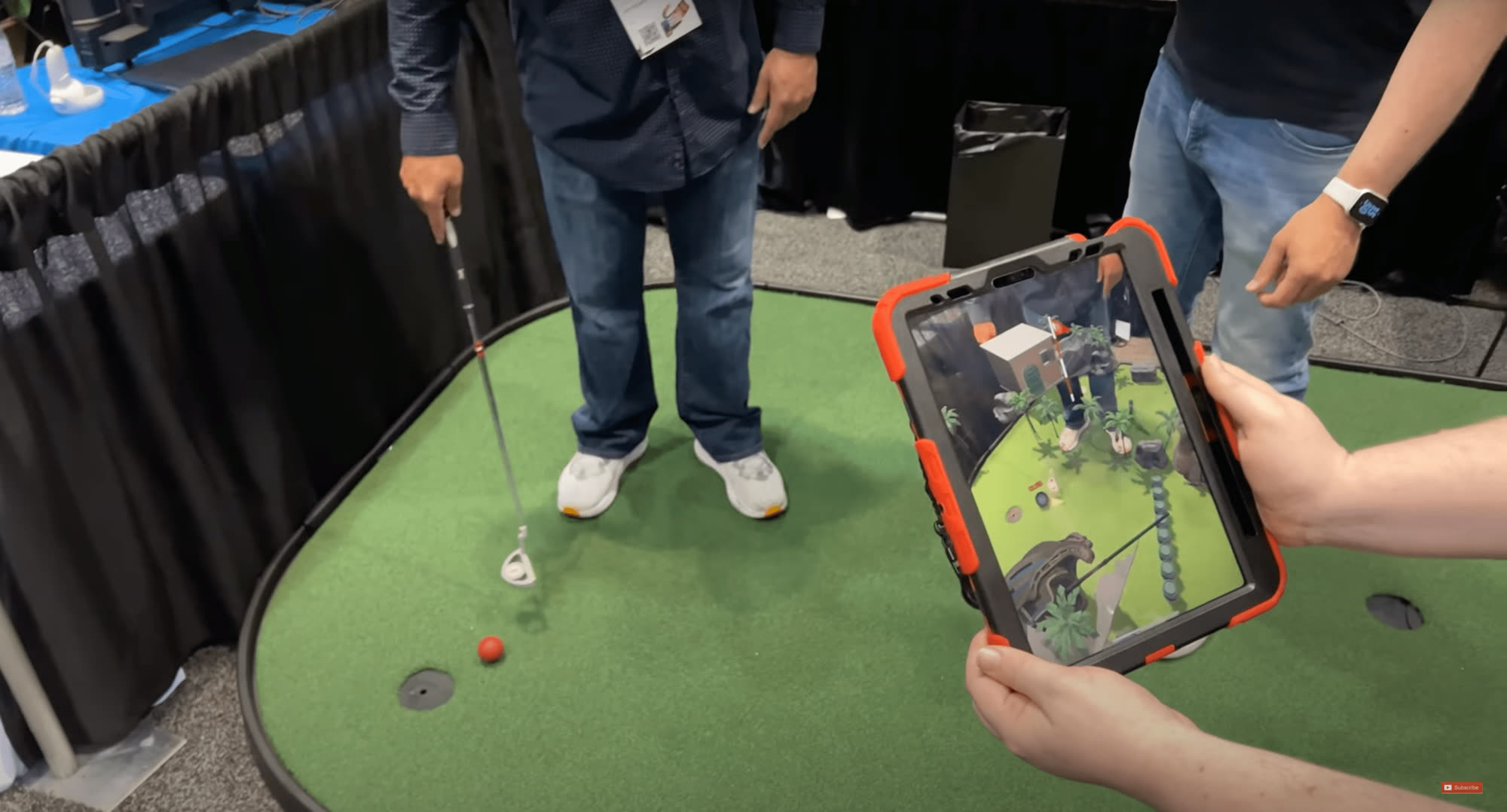
Puttscape is the result of a collaboration between enthusiastic mini golfers who also happen to be experts in computer vision and augmented reality. After years of deploying AR/VR at theme parks and other entertainment venues, the founders of Puttscape (DAS Labs) decided to bring the magic of augmented reality to their favorite pastime.
The Process
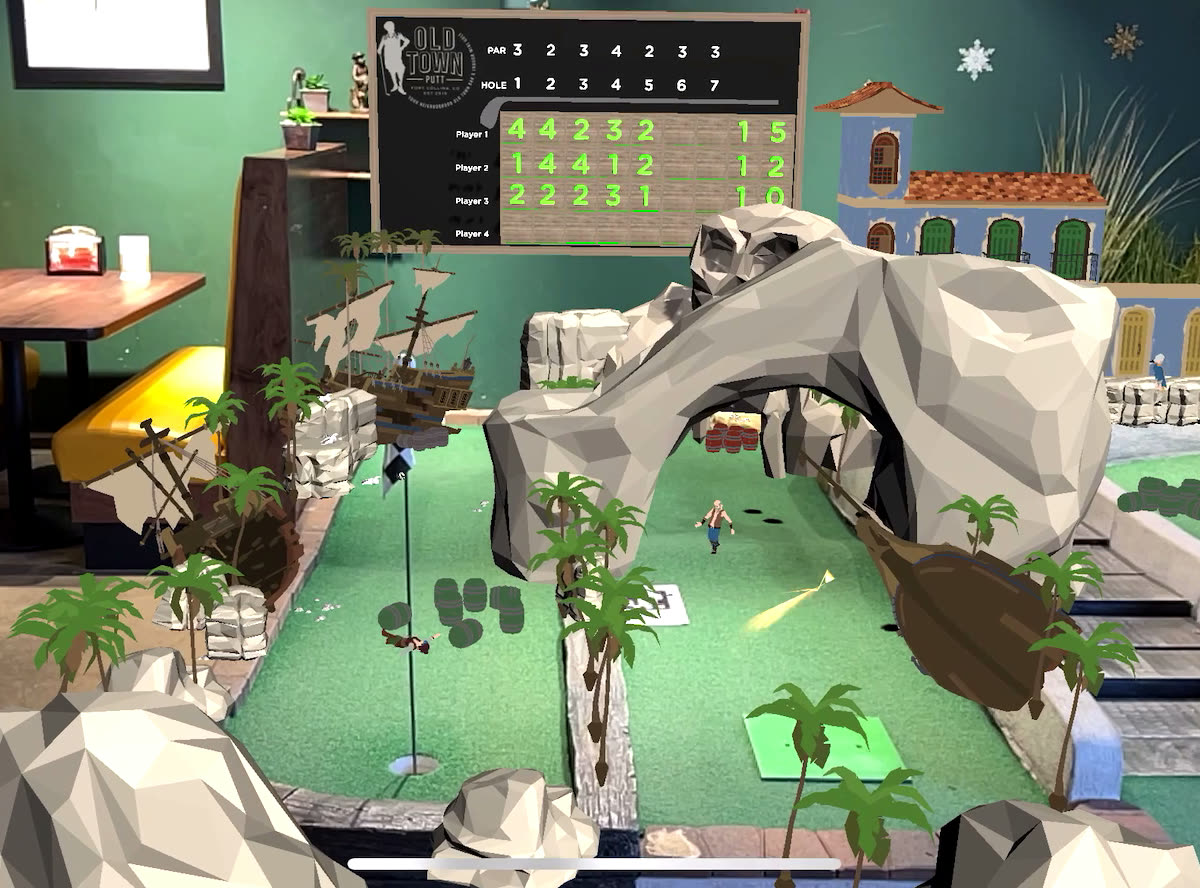
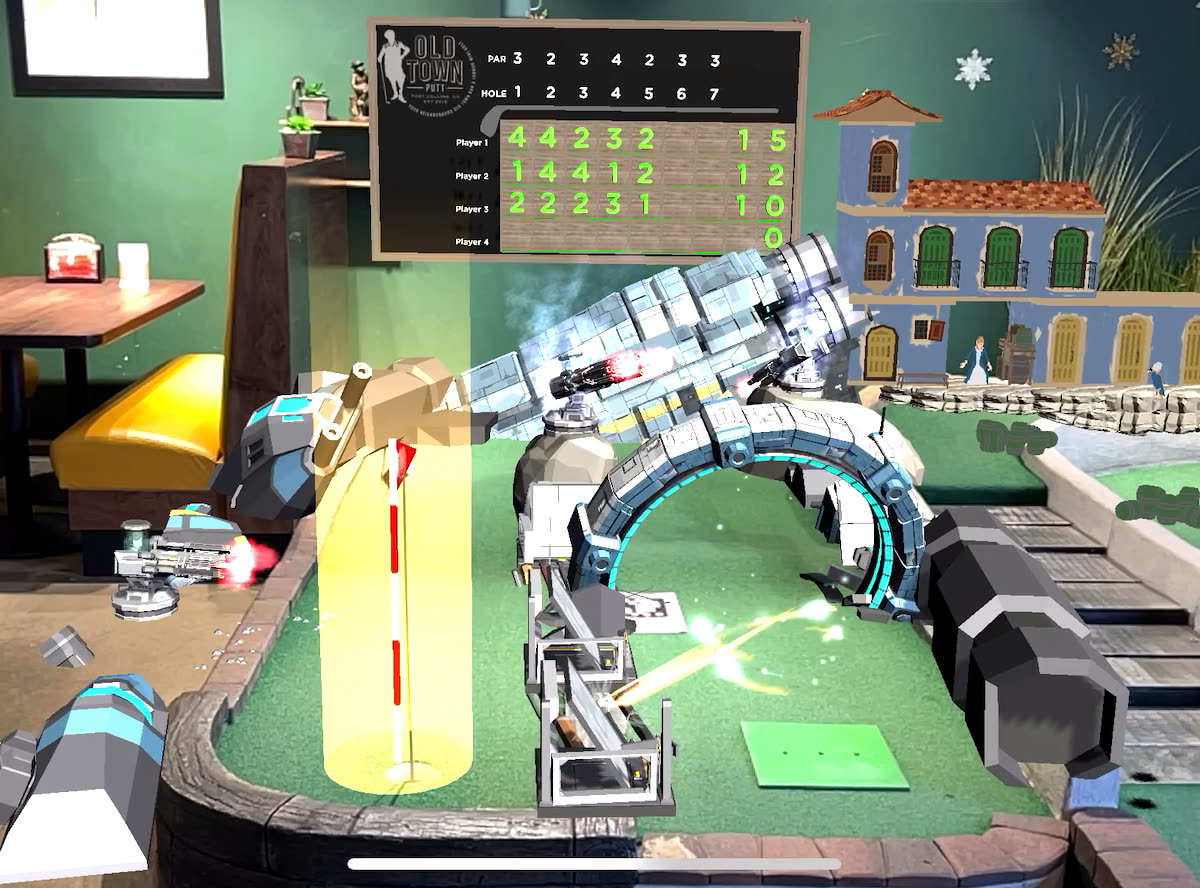
Using the Niantic Lightship ARDK, we digitized a mini golf course and layered in interactive AR scenes with pirate and space themes. Real-time ball detection through computer vision let players trigger dynamic AR elements as they played, while unlockable coupons and freebies blended the physical and virtual sides of the experience.
The digitized mini golf course, ready for AR overlays
How it works:
Scan and map: advanced scanning and mapping technology adds AR gamification to a customer's existing mini golf course
Reskin with AR: enhance the course without costly physical renovations, with elements that react to players' shots
Multiple themed games: offer a variety of AR gaming experiences on each course, for excitement and choice
Increased replayability: apply alternative "metaverses" to the same course to bring players back for more
The pirate and space overlays below sit on the exact same physical hole. Only the AR layer changes what players see.
Alternate level scenes can be overlaid on the same golf courseA space-themed scene overlaid on a Geospatial Anchor
Outcome
This use of the Lightship ARDK delivered a memorable adventure, combining mini golf with augmented reality at the amusement park, and it was featured at the 2023 Augmented World Expo.
What if trading cards came to life in augmented reality?
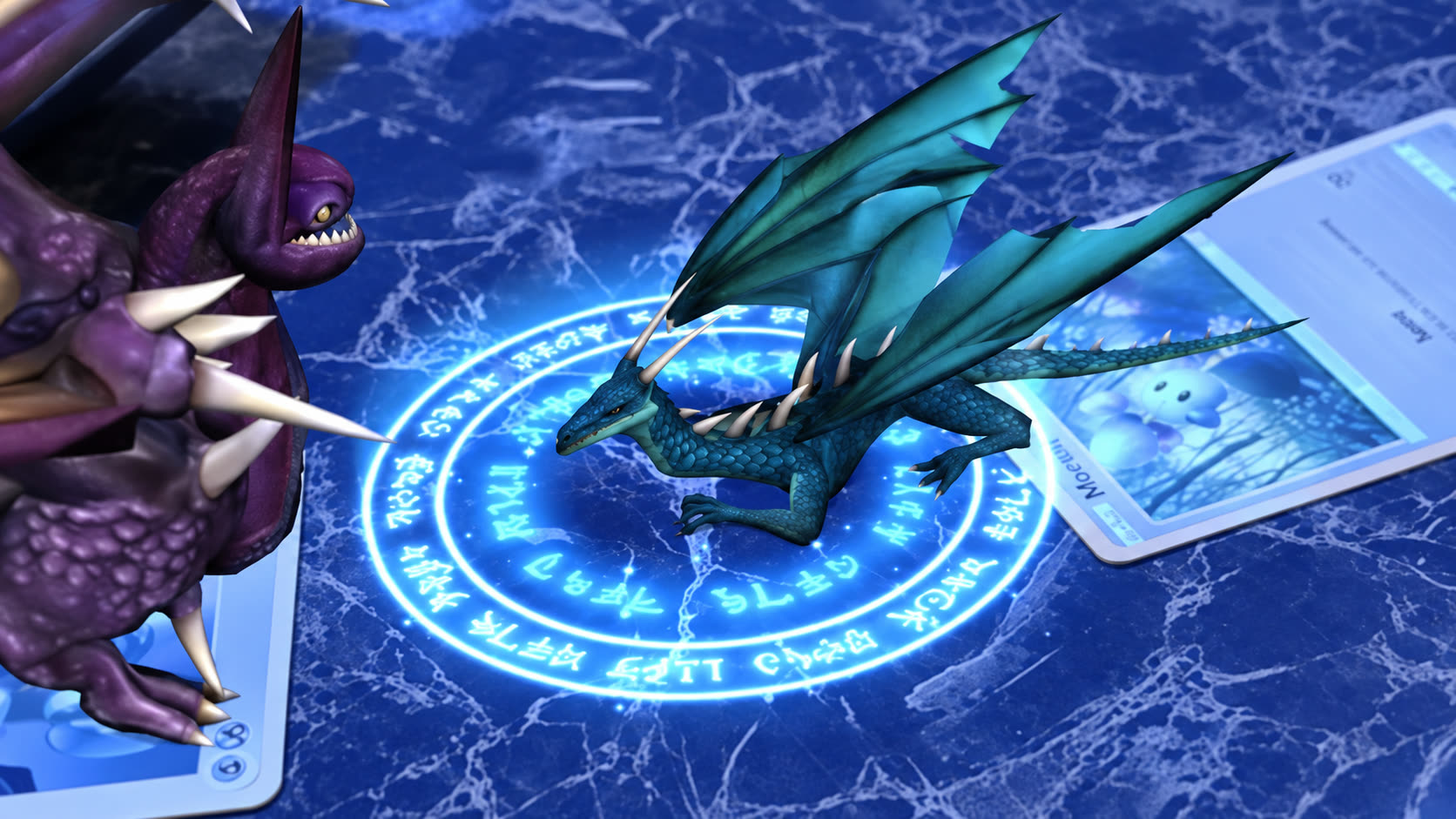
An AR card game where monsters battle it out with magical elemental powers before your very eyes. Scan your deck of cards one by one with your phone. Once both teams are set, battle your opponent in AR.
The Process
Built in Unity with the Vuforia plugin, the game recognizes individual playing cards on any surface through an Android or iOS camera, then renders two teams of three monsters that fight it out until a winner is decided.
A 3v3 battle on iPhoneA demo of both sets of moves
The core mechanic is an elemental damage system in the spirit of Pokémon: an expanded rock-paper-scissors, where each monster's type is super effective against some types and weak against others. Fire creatures deal double damage to grass creatures but only half against rock. I stored each element in a two-dimensional array referencing a damage modifier against every other type.
Sourcing 3D assets from marketplaces like TurboSquid and CGTrader was its own challenge, since there's no standard file format between sellers. I learned to extract textures in Blender and re-import them into Unity so every character would render with cohesive colors and materials during a battle.
Outcome
This was a fun project that just kept growing: 22 monsters, 44 unique primary and secondary attacks.
What if ocean conservation was taught through a VR adventure?
Sea urchin populations have exploded as marine ecosystems fall out of sync, destroying kelp forests and threatening ocean resilience in the fight against climate change. Without the predators that used to keep them in check, urchins mow a kelp forest down to bare rock and hold it there, an "urchin barren" that can persist for decades, taking the fish, the carbon capture and the coastline protection with it. This VR urchin-smashing adventure puts a hammer in your hand and teaches players about that fragile balance from the inside.
The Process
Real-world kelp canopy loss along the California coast - the ecological crisis behind the game
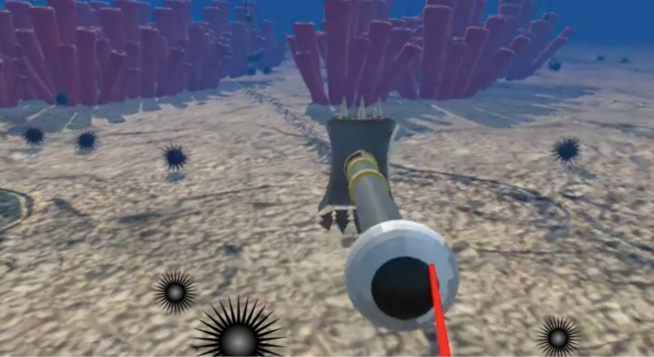
My first VR project, built for Oculus Quest 1 and 2. It casts the player as a hammer-bearing scuba diver. Players start by buying gear from a dive shop, then head out to destroy runaway sea urchins before they can consume an entire kelp garden.
A 20-foot great white on the hunt below
One of my favorite pieces was the AI governing the urchins: they wander randomly until they spot nearby kelp (storing its position in a list), then calculate the nearest patch and head for it, depleting its health on contact. If all the kelp is gone before the timer runs out, the player loses. Fish and the occasional great white shark were built the same way: swimming around, searching for cover in the kelp, or, for the shark, hunting below for a tasty player. Watching a 20-foot shark swim straight at you in VR never got old.
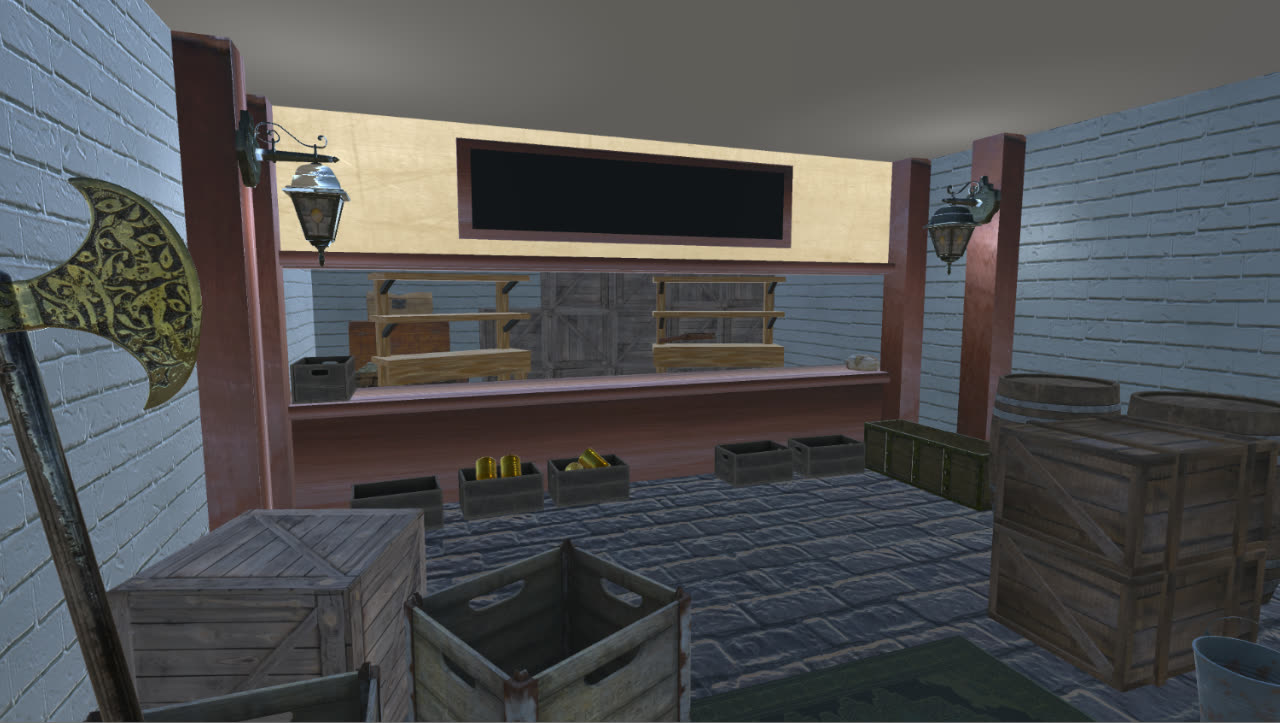
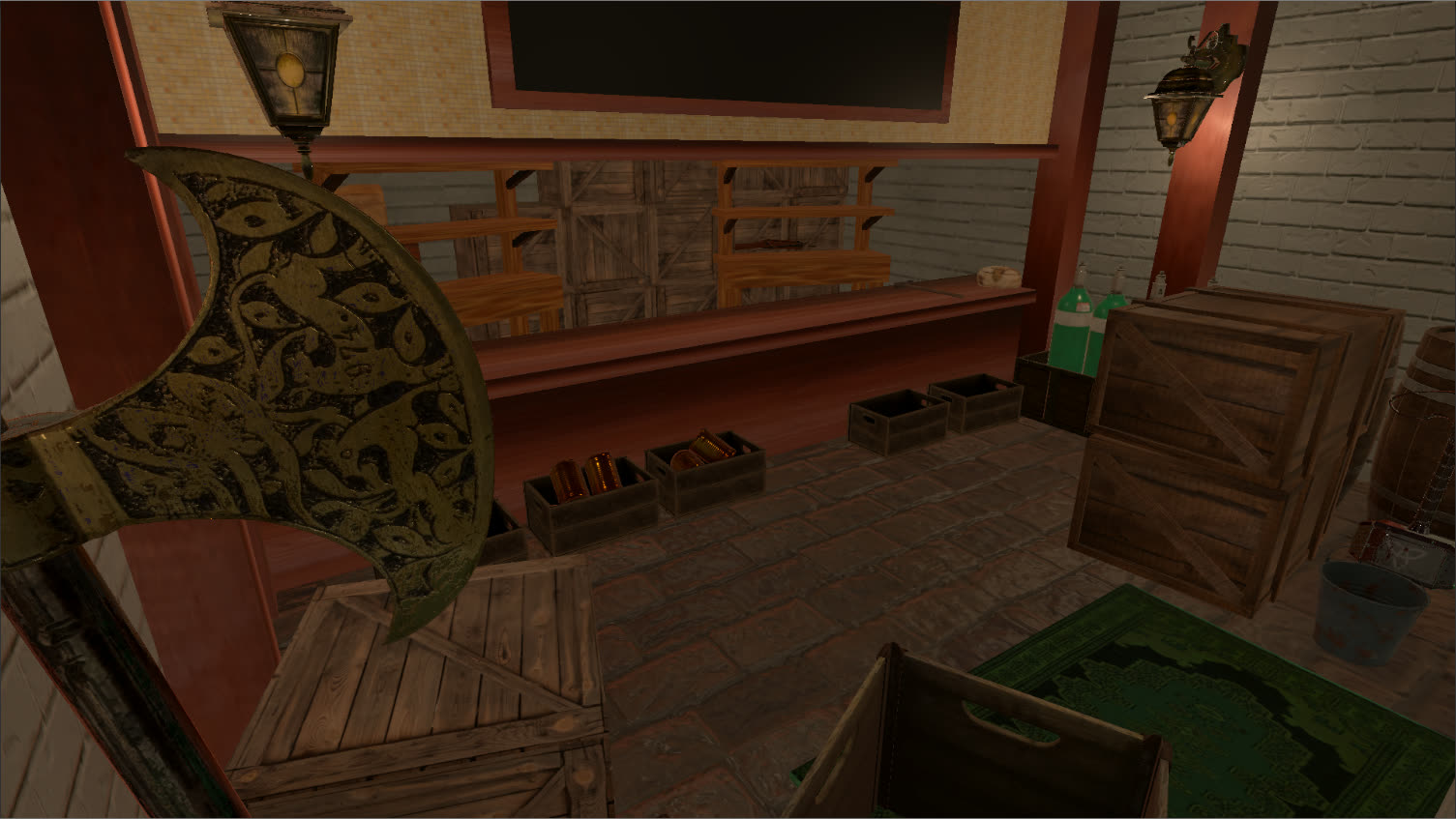
In this project I also learned how much light and shadow do for the realism of a 3D scene. The two images below show the dive shop with and without lighting effects.
Dive shop scene: no lighting effectsDive shop scene: with lighting effects
Outcome
This was my first project built for VR, and it left me hooked. From urchin AI to a shark that actually feels like a threat, small systems add up fast.
What if painting a digital world was at your fingertips?
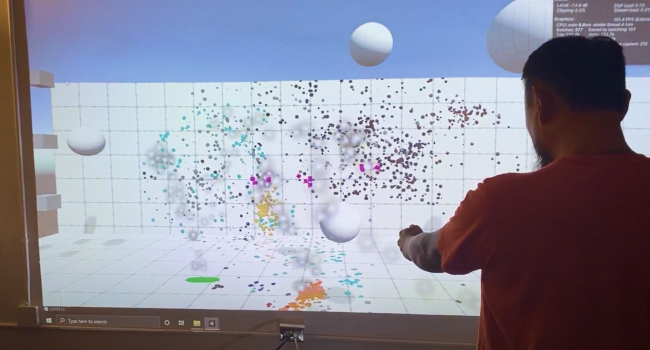
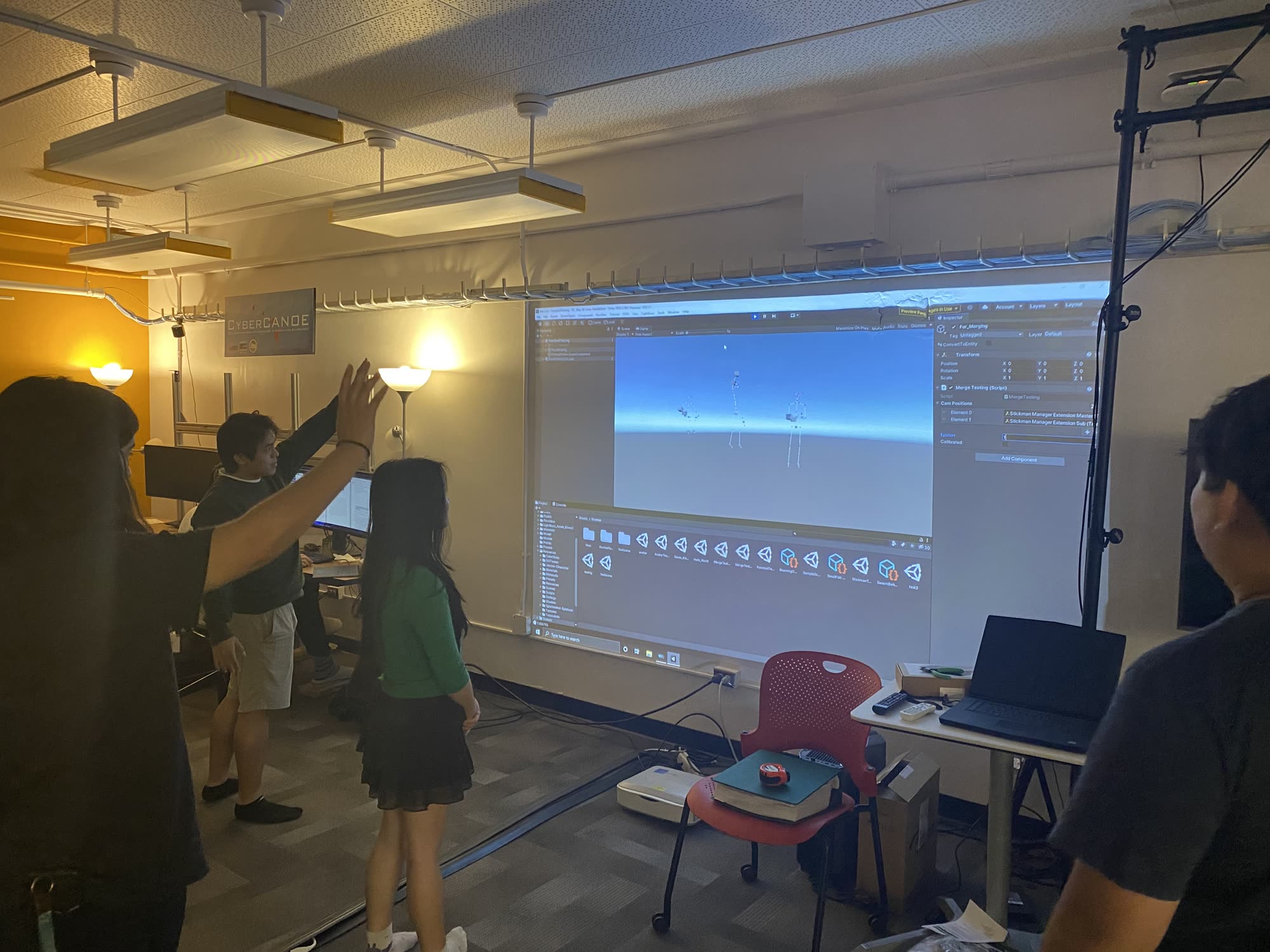
A body-tracking "Splatoon-type" painting game built to demonstrate the power of Azure Kinect DK technology. Players use their whole bodies to digitally paint on the walls with projections. No joysticks, no controllers.
The Process
Everyone who walked by wanted to be a part of the testing process
This was a fun collaboration with the Create(X) projection space at the University of Hawai'i at West Oahu and the Laboratory for Advanced Visualization & Applications (LAVA). Our small team was tasked with a new interactive demo to help visitors engage with the projection screens.
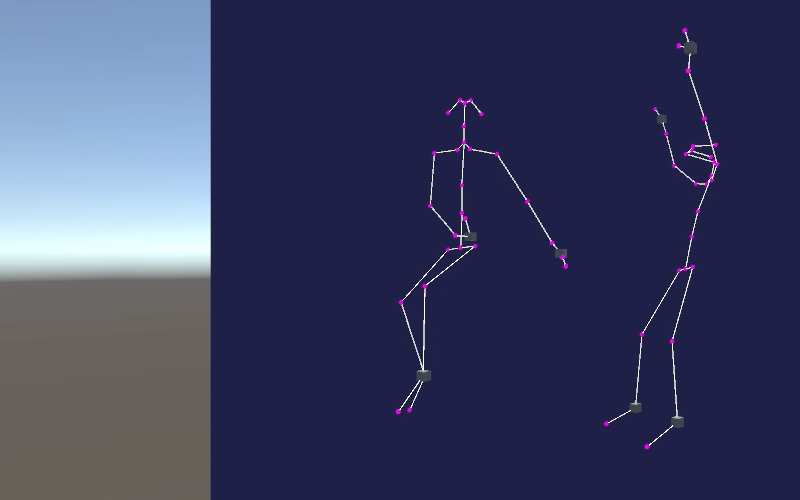
Groups of players controlled a paint sprayer with their arms to cover as much of the world in color as possible, with a scorekeeping mechanic tracking who'd covered the most area. We built the game in Unity; the hardest part was working with multiple Azure Kinect DKs at once. The tracking system tended to lose a player moving from one sensor to another, or double-count someone visible to two nearby cameras.
Full-body tracking using the Azure Kinect DK in Unity
One approach was calculating the ratio of distances between body parts to identify individual players, based on physical proportions or limb angles, but that broke down when two nearby players were a similar height and pose. In the end we used player position data to disambiguate: if a player was visible to more than one camera, the game only displayed them from whichever camera they were closest to.
Outcome
Multiple projectors were set up with Azure Kinect DKs tracking every section of wall around the lab, a setup with promising applications for art exhibits, advertisements, and conventions.
What kind of creative gaming innovation can unfold in just a few days?
Two mini-games built to push the limits of rapid development: a 3D flight simulator and a 2D arcade-style catcher, each with its own challenges and gameplay.
The Process
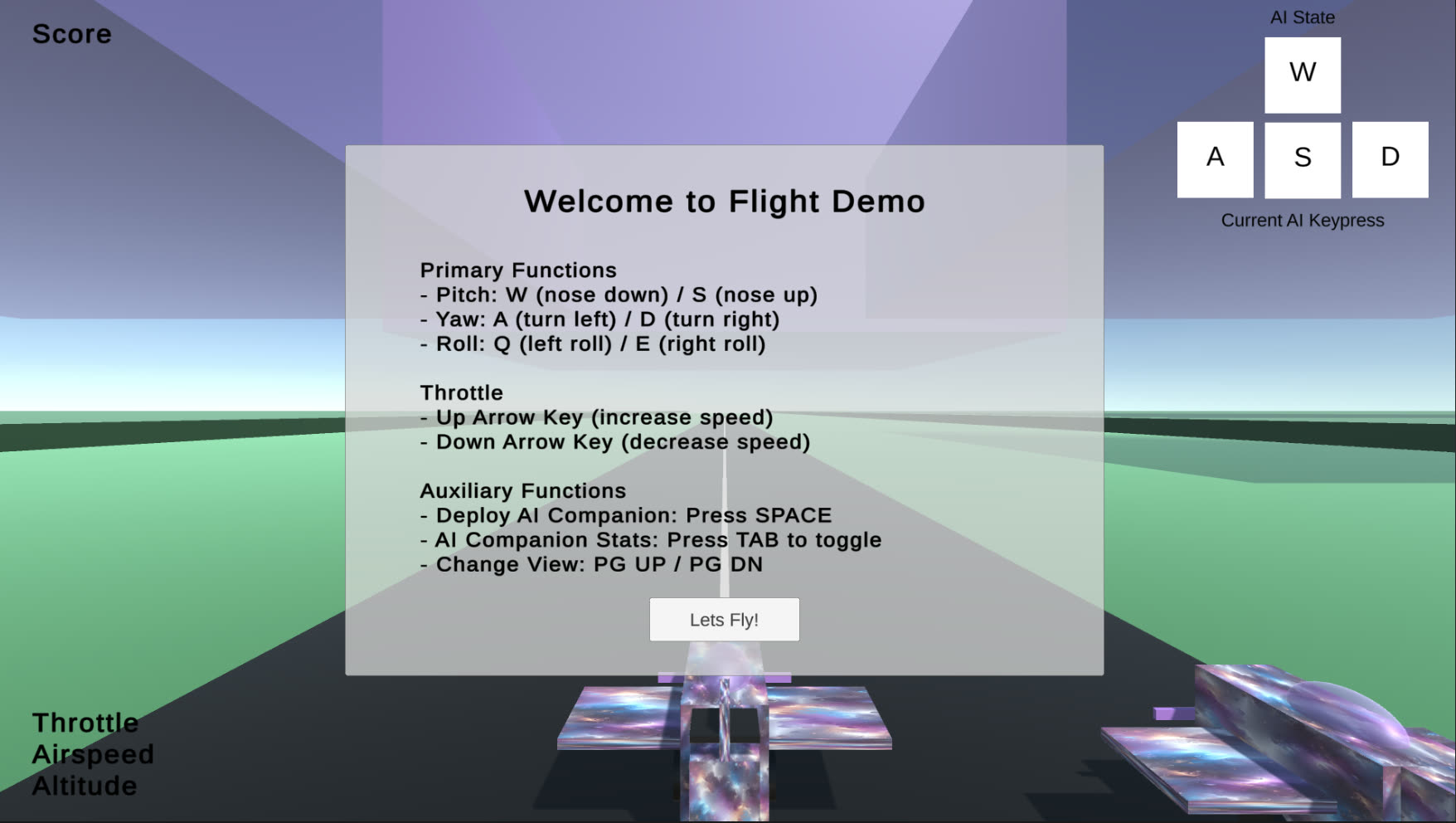
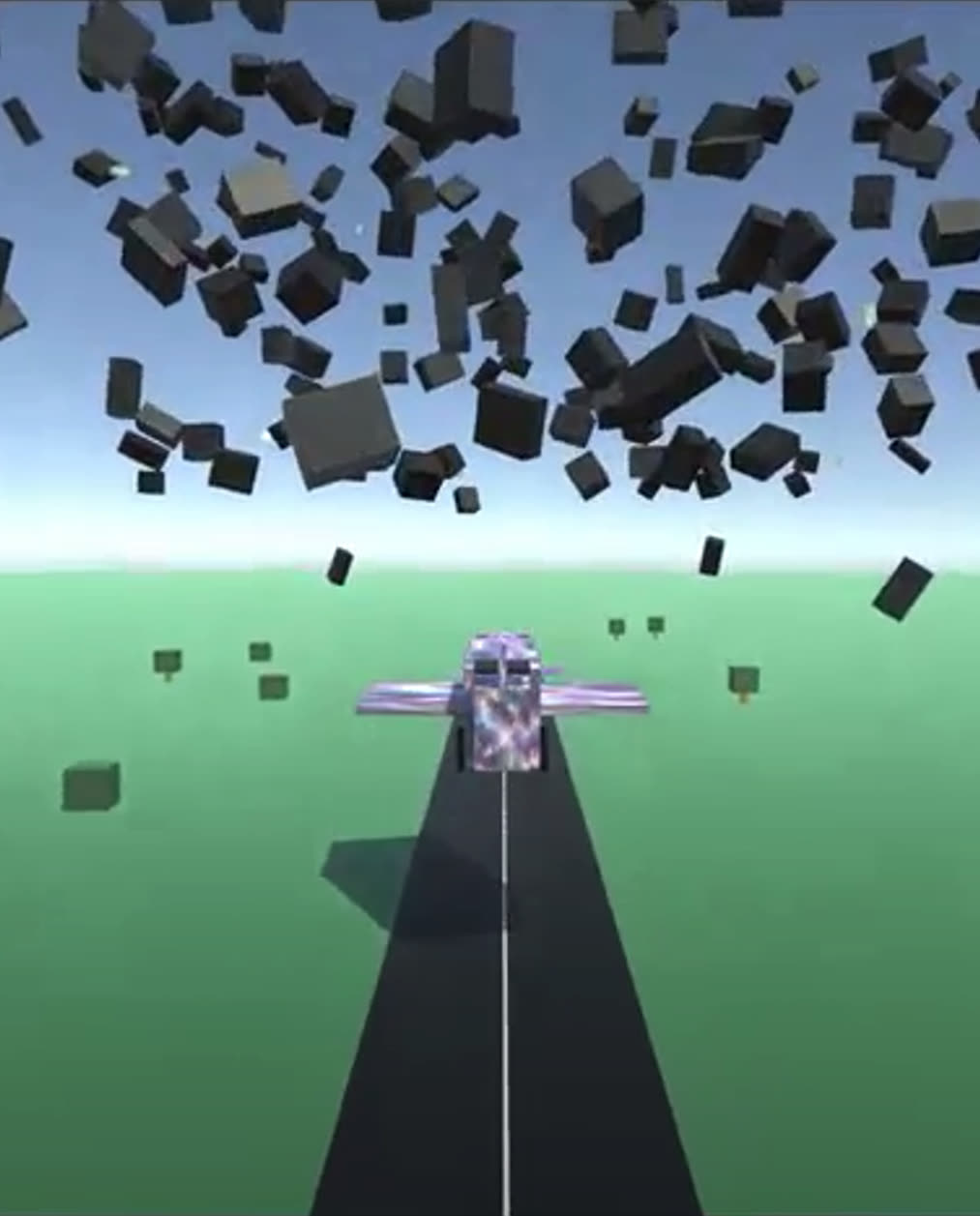
Flight Simulator is a realistic 3D flight experience with physics-based movement and control responses that replicate piloting a single-engine aircraft. It also introduces an AI companion using custom algorithms for obstacle avoidance and target tracking.
Flight Simulator - the start screen, with AI-companion controls
Catch the Falling Objects is a trip back to classic arcade style: catch gems and coins while avoiding bombs. Built with ScriptableObjects for easy customization, combining data-driven design with nostalgic pixel art and audio.
Flight Simulator - dodging falling debris in flight
Key features:
Realistic flight dynamics and AI in Flight Simulator, showing off physics and AI programming
Engaging, addictive gameplay in Catch the Falling Objects from simple mechanics
Both games built within a single week, a study in rapid, efficient development
Note: the in-browser builds aren't mobile-friendly.
Outcome
Two genres, a week each. What that demonstrates is less Unity proficiency than knowing how to scope something small enough to actually finish.
What if underwater robotic research didn't have to stop to recharge?
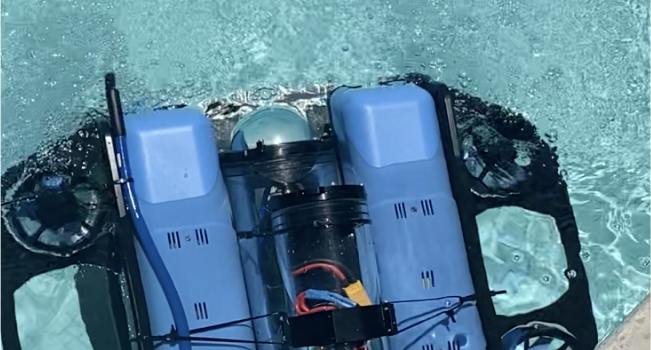
As lead electronics engineer, I developed and assembled a resident underwater remotely operated autonomous vehicle for research at the University of Hawaii. The goal: a vehicle that self-charges underwater, so it never has to surface mid-mission.
The Process
Based on the Blue Robotics BlueROV2, this vehicle operates remotely and wirelessly collects data from a suite of sensors on ocean conditions. For over a year I worked with graduate students at the Robot Autonomy and Navigation (RAN) lab, assembling and testing its circuits. It carries an onboard Linux computer for self-piloting missions, with the ultimate goal of piloting via optical and acoustic modems for data transfer.
Assembling and testing the ROV's electronics
The key goal of my work was making the ROV recharge itself between missions on a docking platform, like a Roomba, and secure itself in place with powerful electromagnets. The obstacles were constant: remote operation, data transmission, corrosion. It demanded both computer science and electronics skills, drawing on my Arduino experience and my two Associate of Science degrees in General and Digital Electronics.
Calibrating the IMU sensor
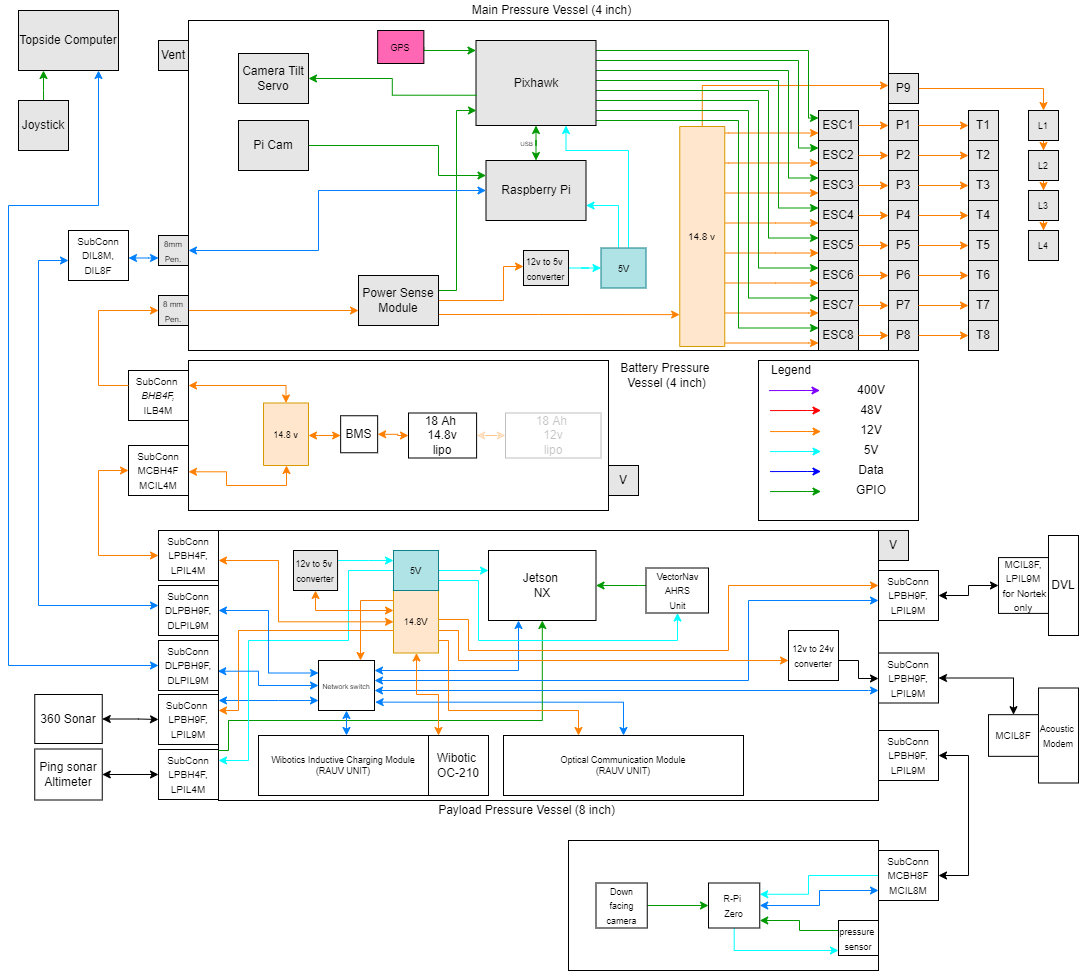
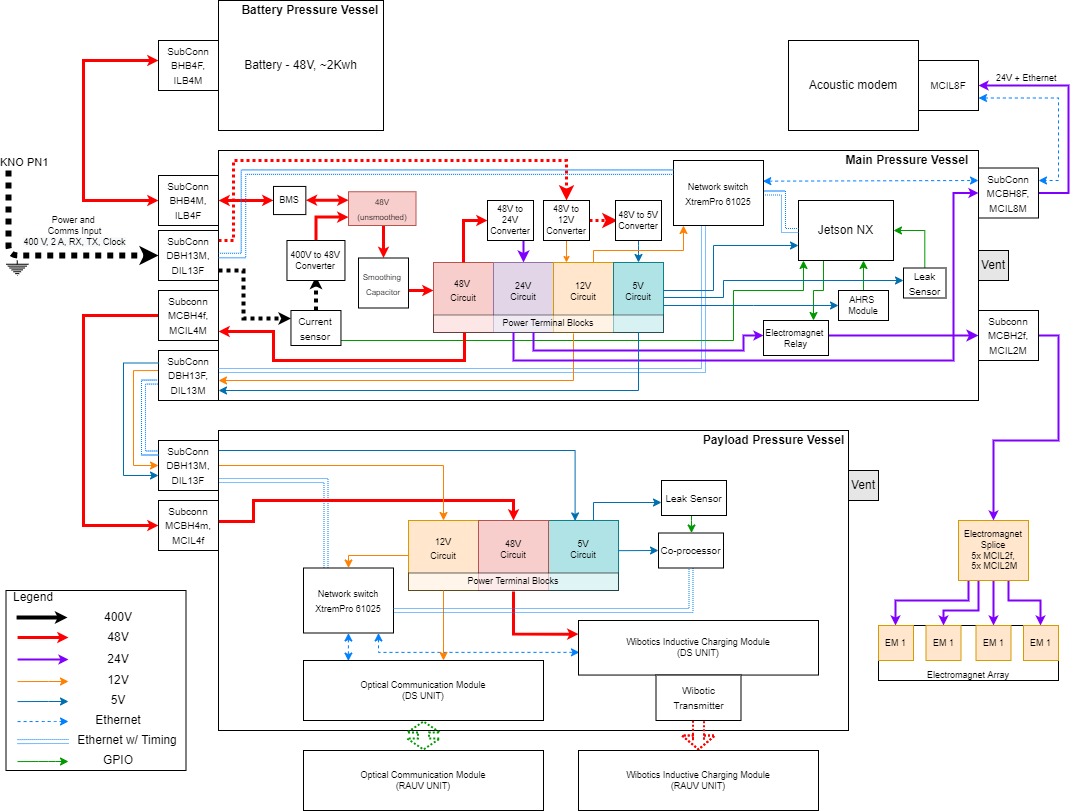
I drew and built both sides of that system: the vehicle's own harness, and the permanent dock it returns to. The diagrams below are the ones the soldering iron followed: every sensor, thruster, modem and induction coil that had to keep working while submerged.
Outcome
Bench-testing the induction link: the controller reports whether a receiving coil is in range
Wiring diagram for the underwater autonomous ROVWiring diagram for the permanent underwater docking station
This is one of the longest-running projects I've worked on. It took over a year before every component was assembled and tested in the water. The ROV has since supported several graduate students' theses, now that it can run programs and execute commands on its own.
What if drones could help create realistic 3D objects?
Drone capture of high-resolution images of small buildings and structures, turned into 3D assets for game development. Photogrammetry is a great way to build detailed 3D assets from real objects, large and small.
The Process
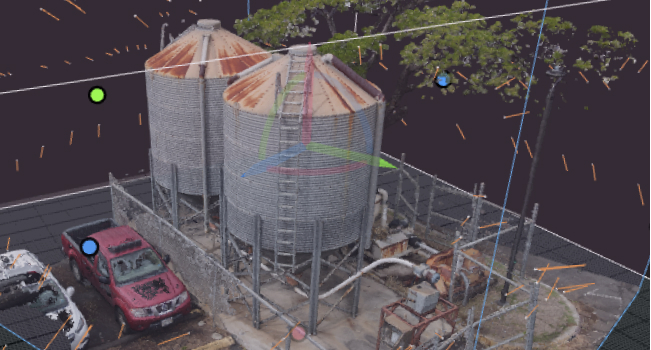
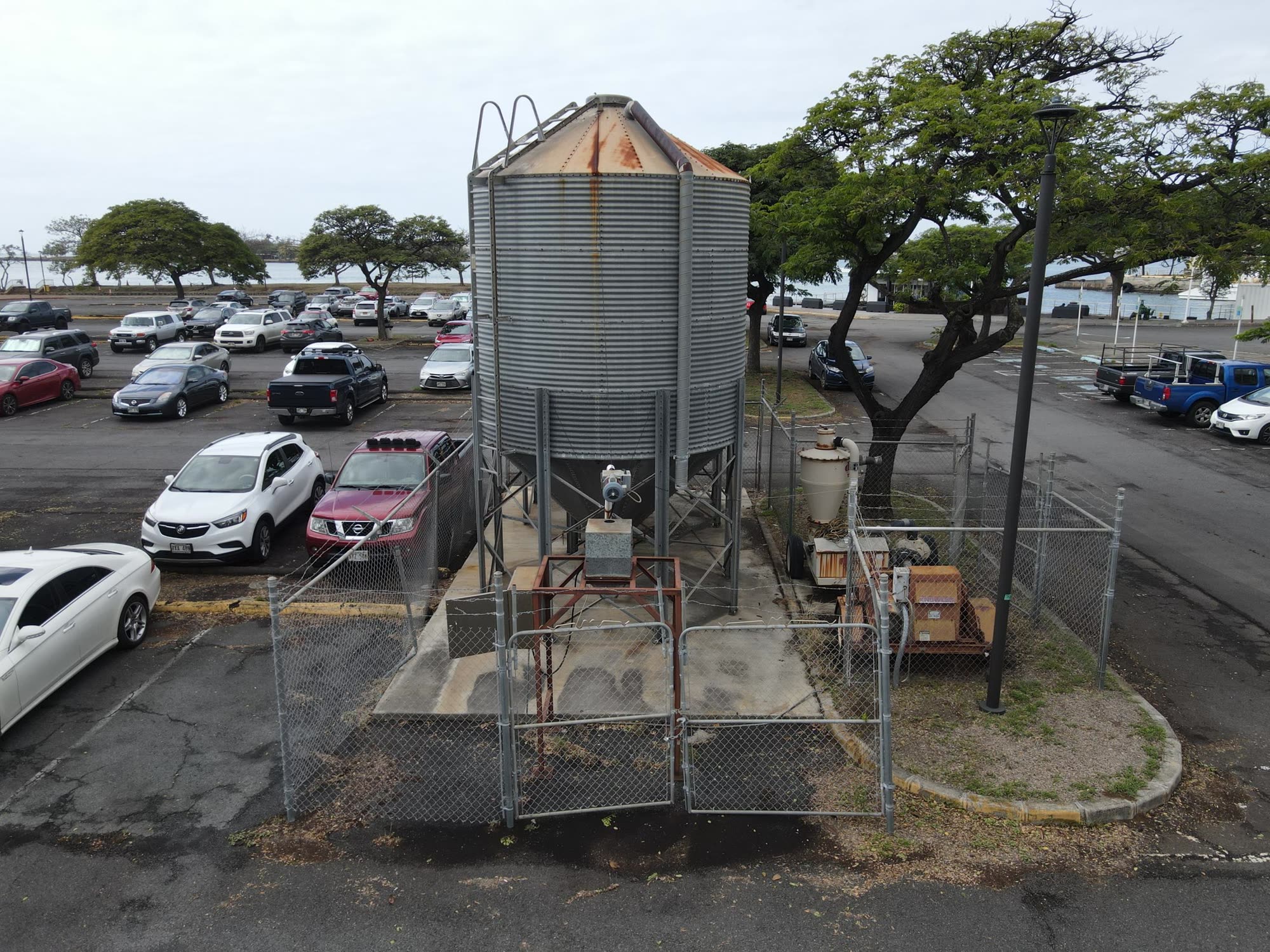
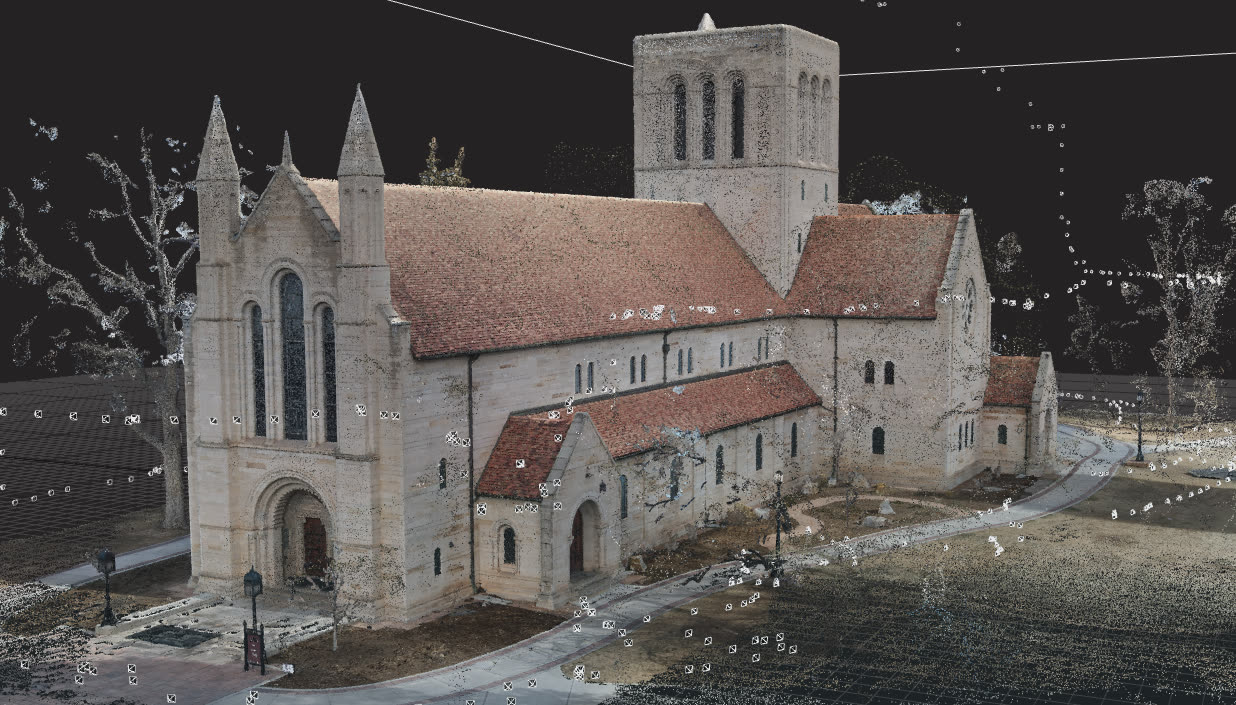
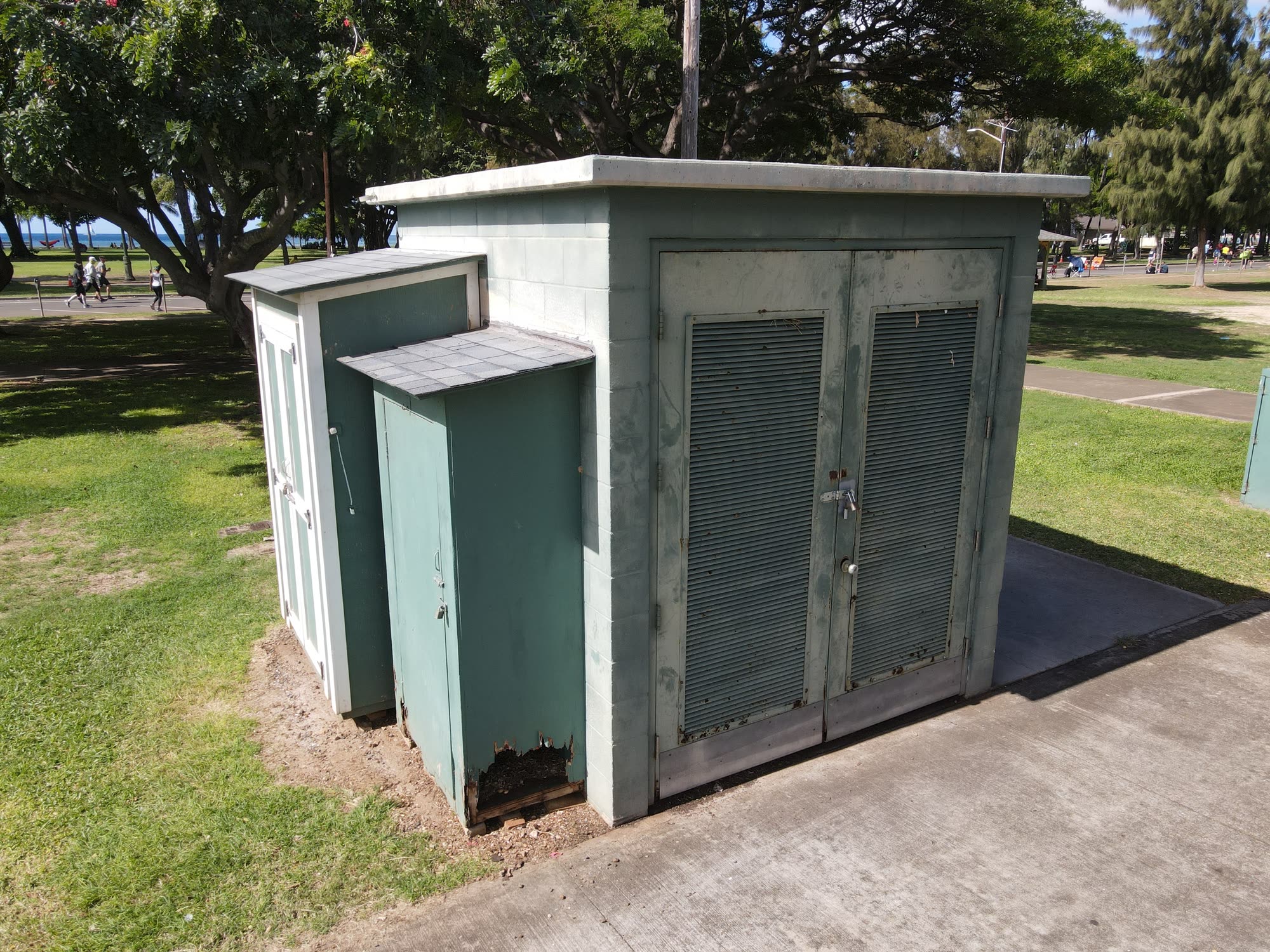
The process means capturing images of an object from many angles, then using software to merge them into a 3D asset. With a DJI Mavic Air 2, I captured high-resolution images of sheds, water towers, and even a large church.
One of several hundred images used to build a 3D model of the siloPhotos from all around the silo, merged into one model
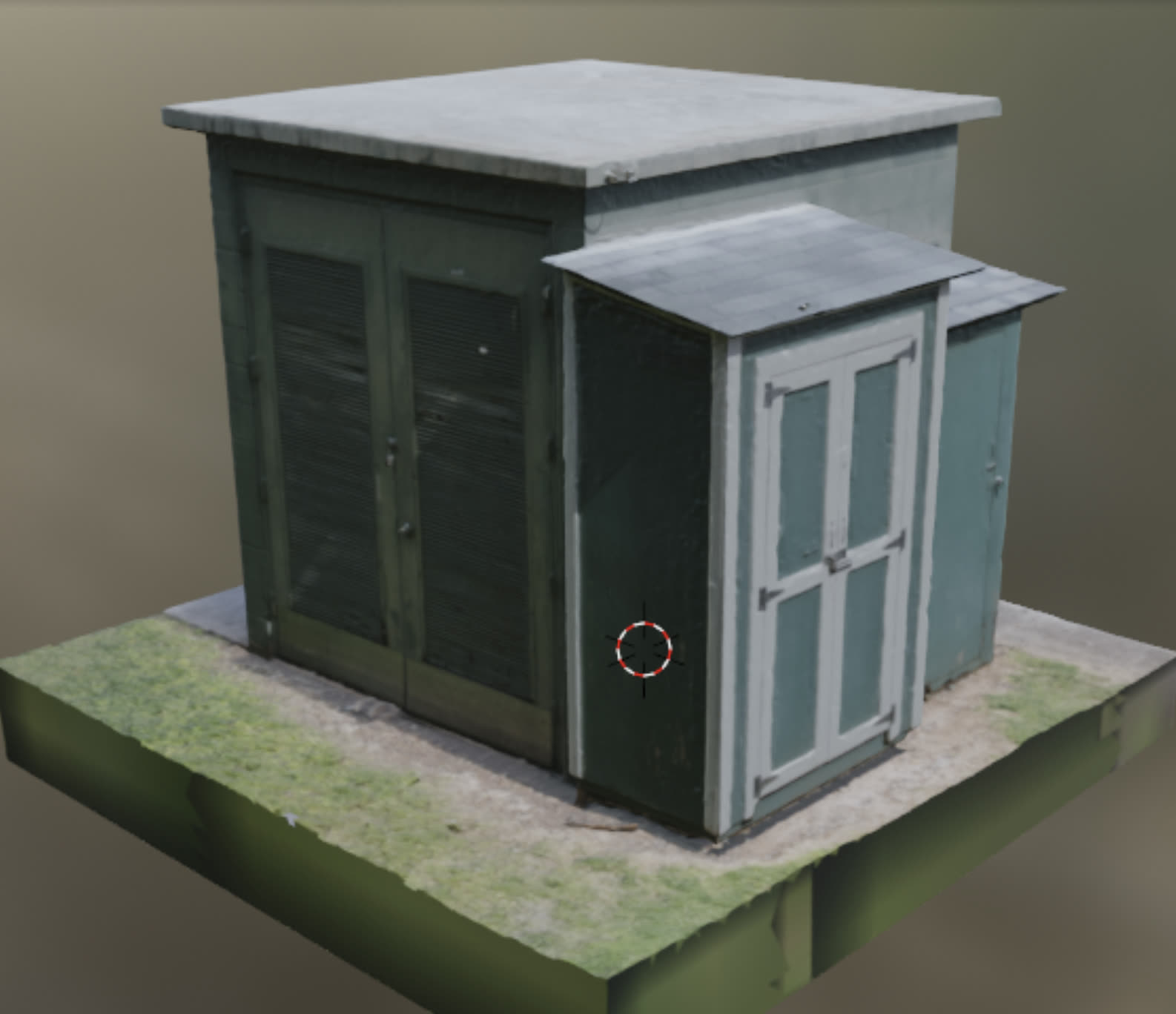
From that image data I could build detailed FBX files with both textures and polygon data, often several gigabytes for a raw, unmodified file. I learned to reduce the polygon count in Blender, turning 2GB files into detailed 50MB versions that use a fraction of the resources while keeping high-quality textures. That skill is useful for bringing almost any physical object or landscape into a game or virtual world.
A church, captured and reconstructed via drone photogrammetry
After learning this I wanted to model everything I could. Capturing tangible objects and converting them into digital assets never got old. Anything I see can become a 3D .fbx or .obj file: editable in Blender, imported into Unity or Unreal, or even physically 3D printed.
A garden shed in Kapiolani Park, OahuThe composited 3D model
Outcome
This project combines both my love of drones and remote-operated vehicles and my interest in building three-dimensional worlds. Download zip files of my custom 3D assets with textures below.
Circuits, sensors, and the firmware that drives them
What if the interesting part of a project is the part with wires coming out of it?
Before the Unity work there was a soldering iron. Circuit design, microcontrollers, sensors, and the firmware that ties them together. The layer where software finally has to admit that the physical world exists.
This is the electrical half of the bench. The printed parts that hold all of it in place are on the 3D printing page.
Where it comes from
I hold an Associate of Science in Digital Electronics and General Electronics, but the degree I reach for most often is the Bachelor of Science in Computer Science from the University of Hawaiʻi at Mānoa. Nearly three years as lead electronics engineer at the university's Robotic Autonomous Navigation lab turned the electronics side into practice: schematic capture, board assembly, testing, a great deal of soldering, and the low-level C, C++ and Python that talks to sensors and motor controllers. The resident underwater ROV came off that bench. A vehicle that finds its own dock and charges itself underwater is an electronics problem long before it is a software one.
The pattern that keeps repeating is a small board, a sensor, and one honest question about what that sensor can actually tell you.
Face tracking, end to end
The phone finds a face and the ESP32 keeps it centered
An old Android phone runs a Unity app built on OpenCVForUnity. It finds a face in the camera feed, works out how far off center that face is, and sends a correction over a USB serial link to an ESP32. The ESP32 drives the two servos. Print the mount, flash the board, install the app, and the rig follows you around the room.
The awkward part was the link between the phone and the microcontroller. Unity on Android has no USB serial support of its own, so the project wraps a native Android serial library and exposes it to C#. I published that wrapper separately, because it is the piece anyone doing phone-to-microcontroller work will need, and the piece least likely to be fun to write twice.
Using a phone as the vision sensor is the point. A handset three generations old is still a calibrated camera, a fast processor and a battery in one package, which beats bolting a webcam to a single-board computer. The mechanical side of the rig is on the printing page.
Reading a mechanical event without touching it
The shot-detection unit clipped to a gas blowback training replica
A magnet rides the blowback assembly of a gas blowback airsoft platform. A hall-effect sensor watches it from a fixed distance. When the bolt cycles, the field at the sensor changes, the unit registers a shot, and it pulses a laser so a target system can score the hit.
Choosing a hall sensor over a microswitch is the whole design. There is no contact, so there is no wear surface, no bounce to debounce, and nothing that eventually breaks from being struck a few thousand times. The sensor never touches the moving part. It just notices it going past. It also means the unit does not care how the replica is finished, because a magnetic field reads the same through paint or plastic.
Paired with a laser and a target, this turns a training replica into an input device for a virtual range. I built it as R&D toward a government training simulator, and it is still a prototype. The printed housing is the part that has to survive the recoil.
Randomness out of a laser
Laser speckle up close, the entropy source the generator reads
Point a laser at a rough surface and the reflected light interferes with itself, producing a shifting grain called speckle. It is not a pattern you can compute ahead of time. It falls out of the microscopic texture of the surface and the air in between.
The Eye of Sauron is an old Android phone with its camera pointed at exactly that. The app samples the speckle, turns it into entropy, and serves the result over an embedded web server on the local network. There is a REST API, dice endpoints for the obvious use, and a statistics page that runs a chi-squared test on the output, so the quality can be checked rather than taken on trust. When the camera sensor glitches, the affected data is discarded instead of used.
The clip is a close-up of a real speckle from my own laser, shot at enough zoom to be grainy in more than one sense. The housing that holds the phone and the laser in fixed alignment is a printed part.
Watching an environment
Temperature and humidity drawn as a growing vine
A temperature and humidity sensor on an ESP32, showing live readings on a small display as an animated vine. It began as a display experiment and became a controller. The firmware is split into a sensor manager, a display manager, a real-time clock, a Bluetooth manager, an actuator controller and a task scheduler, so adding a fan or a mister is a wiring job rather than a rewrite.
Splitting firmware up like that matters more on a microcontroller than on a desktop. There is no operating system to schedule anything, so if the display code blocks while it draws, the sensor read is late and the clock quietly drifts. The vine was the excuse to build all of that. Animating a growing plant frame by frame on a small display is a far harder scheduling problem than printing two numbers, which is most of why it was worth doing. A related idea, live weather turned into color on a wall of LED panels, has its own page.
A board of my own
Most of the above lives on a breadboard. The 8-motor driver board is the one I laid out properly: an RP2040 Zero on a carrier with four L293D drivers, which is eight motors driven bidirectionally from a single board. An 820µF bulk capacitor sits on the motor rail with 100µF per driver, because motors are electrically rude to everything sharing their supply. Screw terminals for the outputs, breakouts for 3.3V and 5V, and a status LED on a spare pin.
The control protocol is deliberately dull. The board listens on UART for eight signed bytes, one per motor, where the sign is direction and the magnitude is duty cycle. Anything that can write a byte can drive it.
Toolchain work
Getting C onto a Raspberry Pi Pico from Windows was irritating enough that I wrote down the short version: the Arm toolchain, CMake and Ninja, compiling to an ELF and converting it to a UF2, with no IDE in the way. The repository and the four-minute walkthrough exist because plenty of people hit the same wall.
Outcome
Every XR project in this room touches hardware somewhere: a LiDAR sensor, a depth camera, a headset's tracking volume, a drone. Knowing what those parts do at the pin level is what turns a demo into something that still works after you hand it over.
Functional parts, fixtures and prototypes, designed in Fusion
What if the part you needed just didn't exist yet?
Functional prints: adapters, fixtures, enclosures and mechanisms drawn in Fusion 360 for real-world tolerances, printed in PETG and PLA. Not display pieces. Parts that have to fit something that already exists and survive being used.
This is the mechanical half of the bench. The sensors, circuits and firmware that make these parts do something live on the electronics page.
Designing for the machine
Designing for a printer is designing around its failure modes. Overhangs, layer adhesion, the way a hole always comes out undersized, how much a PETG part creeps under load. Every one of those pushes back on the model, and the only way to find the line is to print the part, discover it is 0.3mm too tight, and print it again. Most of what is on my Thingiverse page went through four or five revisions before it was worth uploading.
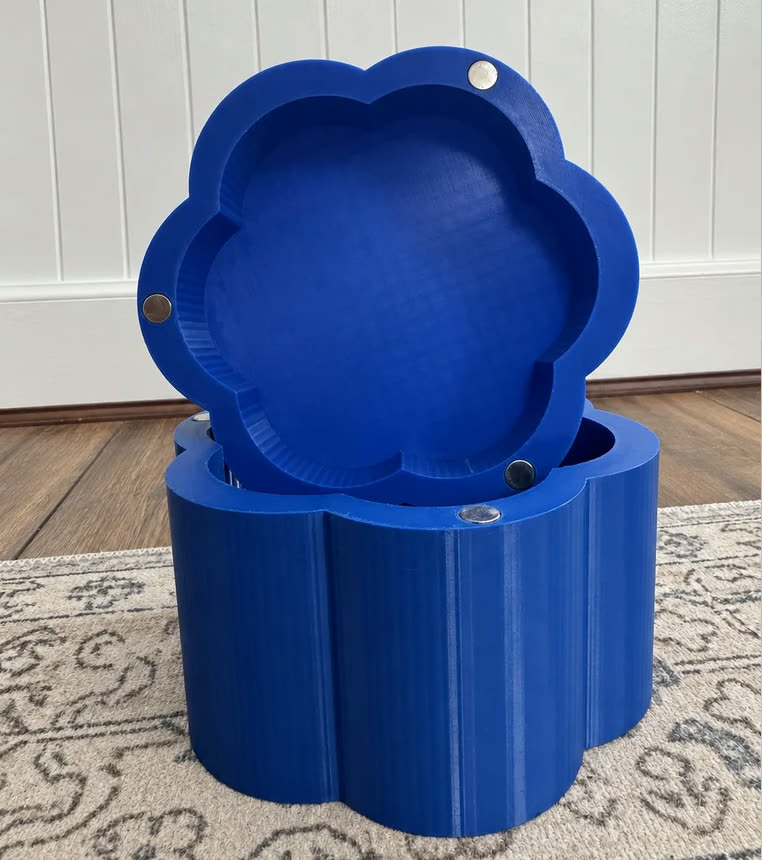
Six-petal magnetic box. The lid snaps on with six disc magnets.
The six-petal magnetic box shows how specific that gets. Six 12mm disc magnets hold the lid on. They are sold as 3mm thick, the ones that arrived measured closer to 2.75mm, so the recesses are cut for what was actually in the bag, and the listing tells you how to add the missing quarter millimeter in your slicer if yours are the full size. The listing also says what I would do differently. Grid infill left faint vertical lines on the outer walls, and the lobes came out faceted at the layer height I used. Publishing the flaws costs nothing and saves the next person a wasted print. The magnets go in with a drop of superglue, and the trick is to seat one half first and then let the second half find its own polarity against it before gluing, rather than trusting yourself to read six magnets correctly by eye.
The capstan drive
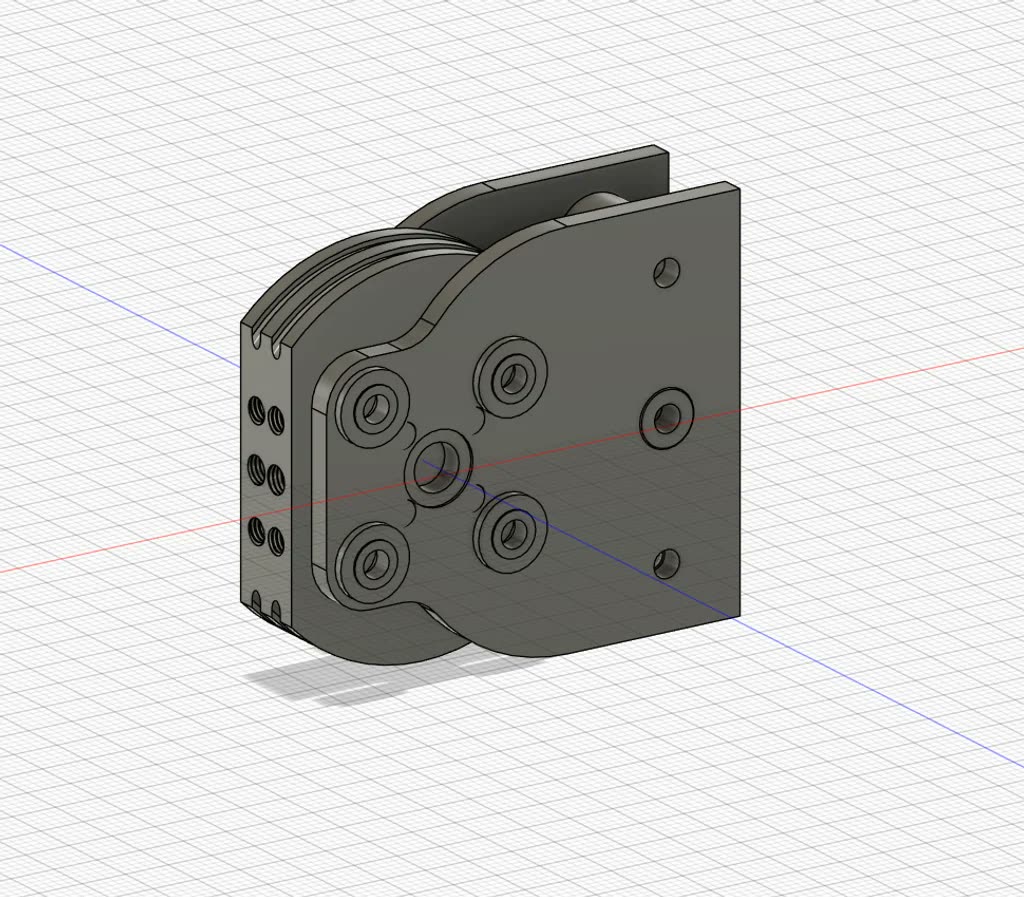
The design I am proudest of is a compact capstan drive, a cable-driven reduction for robot joints in the smallest package I could get it into. A thin cable wraps a small drum and drives a larger one, which buys a big reduction with no gear teeth. No teeth means no backlash and almost no noise. It prints without supports, assembles without special tools, and I tested it through 220 degrees of travel on 1.5mm 200lb Dacron line.
The capstan drive in FusionThe printed drive on the bench, running against an AS5600 encoder
The mount on the front takes an AS5600 magnetic encoder, and that is what makes it useful rather than just tidy. With position feedback on the output, a joint can run closed loop instead of guessing where it ended up.
It is my most downloaded design, for now. The pan-tilt platform below was posted months later and is closing the gap fast. The capstan's comment thread has been the most useful design review I have had. People print it in materials I have not tried, on printers I do not own, and tell me exactly where the tolerances are wrong.
The pan-tilt platform
The pan-tilt mount running its full travel with a phone strapped in
The Universal Pan-Tilt Servo Platform is a two-axis mount that carries almost any small camera, sensor or phone. It is built around standard hobby servos, which sounds simple until you try to get full travel out of them without the tilt arm hitting the pan body.
So it ships with a calibration procedure instead of a fixed range. Pan gets whatever the servo will safely give, tested at roughly 500 to 2400 microseconds on an MG996R. Tilt gets a narrower window, around 800 to 2050, to stay clear of the frame. The repository includes a calibration sketch that steps each servo in small increments, so you find your own limits before you screw the payload down. Servos vary. Telling people to measure theirs is more honest than publishing a number that strips someone's gears.
The clip shows the bare mount running its travel with a phone strapped in. What happens once something is looking through it is on the electronics page.
Prototypes on the bench
Not everything reaches a download page. The longest-running one is a synthetic marksmanship trainer for gas blowback airsoft platforms, a printed unit that turns a training replica into a digital input. The printed part is the hard bit. It has to clamp to the frame, hold a sensor at a fixed distance from a magnet on a reciprocating assembly, and stay in alignment while the thing it is bolted to slams back and forth. How it senses the shot is the other half of the problem.
Requests for this kind of trainer come through SAM.gov regularly. I took a Meta controller apart to see whether I could repurpose it, but it senses magnets for its own tracking rather than for a trigger, so that was a dead end. It works, it is still a prototype, and it has not reached the reliability a military training contract would demand.
Also on the bench: modular AI-controlled watercraft, tracer units, and chronographs.
The rest of the shelf
The usual mix of solved annoyances. Modular solar panel enclosures. A holder for my Bakon soldering station. An OpenGrid mount for a digital caliper. A six-petal magnetic box with a snap lid. And a housing that holds a phone and a laser module in fixed alignment, which is the printed half of a random number generator I could not resist styling as the Eye of Sauron.
Outcome
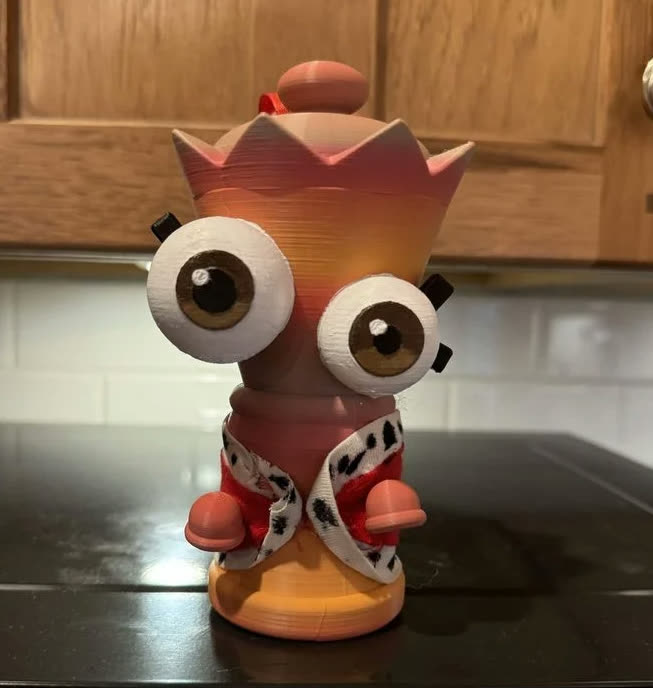
My niece's first upload: a Queenie pendant from The Amazing Digital Circus
The best thing to come out of any of it: I taught my eight-year-old niece to design in Fusion and run a printer. Her first upload was a Queenie pendant from The Amazing Digital Circus, with a fabric coat sewn to go with it and the hands attached like buttons. It passed 100 downloads in just over a week. She was thrilled. I was prouder of that than of anything on my own page. Teaching it also turned out to be the fastest way to notice how much of this I do on autopilot. Explaining why a printed hole always comes out undersized, to someone who has never heard the word tolerance, means actually knowing the answer.
Fun fact: the blue box on the printer behind this card is one of my own designs. This room is printing my own part.
What if the outside weather influenced the lights in your home?
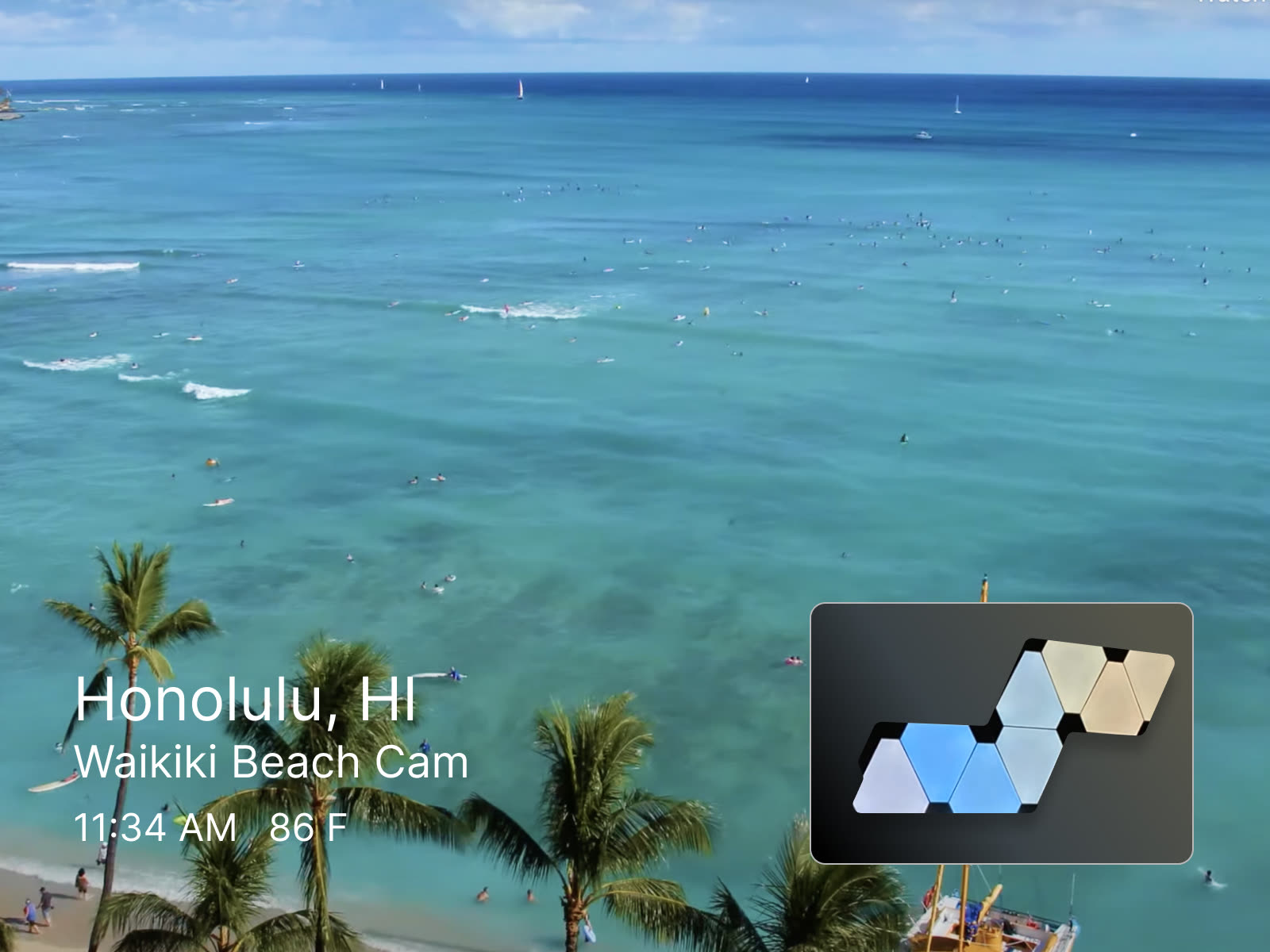
A Python program that pulls from the OpenWeather API for a given location and displays the conditions as color patterns on linkable Nanoleaf light panels. Take the guesswork out of whether you need an umbrella. The lights will tell you.
The Process
The idea came from the LAVA lab at the University of Hawai'i, which has no doors or windows to see the weather outside. We'd often be surprised to leave and find it was already dark, or raining. That inspired a program that constantly pulls weather data for supplied GPS coordinates and displays a representative color pattern on the panels, so everyone stays aware of the world outside.
Using Python and POST requests to talk to the WiFi-enabled Nanoleaf panels, I mapped colors to conditions: a dim purple-and-black flicker at night, pastel gradients for sunrise and sunset, blue-and-green flashes for Hawaii's tropical rain, and dark colors with bright flashes for thunder and lightning. Brightness scales with temperature, brighter when hot and dimmer as it cools, with color selections for nearly every weather pattern, from snowfall to volcanic ash.
Sunny dayNightSunsetRainy
Outcome
This was a fun, rewarding way to learn about working with API calls and POST requests, and it made me confident pulling and parsing JSON data from live APIs.
Two diplomas hang on that wall, but they are the footnote rather than the story. The story is what came after: since December 2022 I have shipped immersive software full time — Unity, XR and AI — for studios and clients who needed something to work on real hardware, on a date, in front of a customer. The diplomas explain how I got the tools. The table below is what I did with them.
The professional track
Role
Where
When
Meta Tech Expert (field IT, contract)
Channel Partners
2026 – present
Lead Unity Developer
Another Reality Studio
2024 – present
Lead Unity Developer
PulseJet Studios
2023 – 2024
Founding Developer (freelance)
Sinthetik Industries
2023 – 2024
XR Engineer / Unity Developer
Dynamic Augmented Solutions
2022 – 2023
Lead Software Developer
ParkSpark
2022
Unity Developer
LAVA Lab, UH Mānoa
2020 – 2021
Lead Electronics Engineer
RAN Lab, UH Mānoa
2020 – 2022
Between them: ten-plus shipped XR experiences across gaming, medical, web3 and government work with $1.5M+ in combined budgets, apps on the Meta Quest store, a WebGL configurator used by hundreds of ShoreMaster customers, an AR measurement tool that cut ForeverLawn's material waste by 15%, and a cloud rearchitecture that saved $35K a year in Google Cloud spend. Lead has meant the whole arc on most of these: scoping the thing, building it, and being the one who answers for it when it ships.
That top row is the newest thing on the list and the odd one out: on the side, I'm the on-the-ground Meta Tech Expert for Channel Partners across Hawaiʻi, third-party field IT for Meta's retail hardware at stores statewide — firmware, connectivity, minor electronics, and keeping a site looking clean when I leave it. It's less Unity and more truck-and-toolkit, but it's a straight line to "worked with Meta" that didn't exist before, and having eyes on the actual retail hardware in the field hasn't hurt my sense of where Quest is heading next.
What I actually do
Engines and languages: Unity 3D, C# and .NET, plus C, C++, Python, JavaScript, Java, SQL, OCaml and Prolog from the CS side
XR: Meta Quest, Apple Vision Pro, HoloLens/MRTK, AR Foundation, ARKit, ARCore, Niantic Lightship ARDK, Vuforia, ArcGIS, Photon
Backend and AI: Supabase, Clerk, Stripe, Render, Vercel, Firebase, Azure, AWS, TensorFlow and PyTorch
3D and capture: Blender, Fusion 360, AutoCAD, photogrammetry with Reality Capture and Luma AI
Hardware: Arduino, Raspberry Pi, circuit design and assembly, iOS and Android deployment
Everything around it: performance profiling, custom Unity editor tooling, CI/CD, and the project management to keep a team pointed the same way
Where it started
The Bachelor of Science in Computer Science from the University of Hawaiʻi at Mānoa is the degree the career runs on. It also came with two jobs: a year in the Laboratory for Advanced Visualization & Applications (LAVA) building projection-mapped, body-tracked games on Azure Kinect DKs, and two and a half years as lead electronics engineer at the Robotic Autonomous Navigation (RAN) lab, writing the low-level C/C++/Python that talks to sensors and hardware.
Before that, an Associate of Science in Digital Electronics and General Electronics from Saddleback College: oscilloscopes, breadboards, and enough soldering to be dangerous. That is where I learned to read a schematic, design a circuit, and fix the one I got wrong. I also picked up a Marine Science Technology certificate in Aquaculture and Aquarium Science there, and a PADI scuba certification along the way, which is how a computer science degree ended up pointed at kelp forests and underwater robots.
Outcome
The job is software, and has been for years. What the electronics background buys is a shorter path to the answer when software meets the physical world: knowing what a hall-effect sensor does, or why a shader is eating your framerate, is what takes a project from "nice demo" to something that survives contact with real hardware — an underwater dock, a mini golf course, an operating room, a music festival.
What if the hobby and the job kept pointing at the same place?
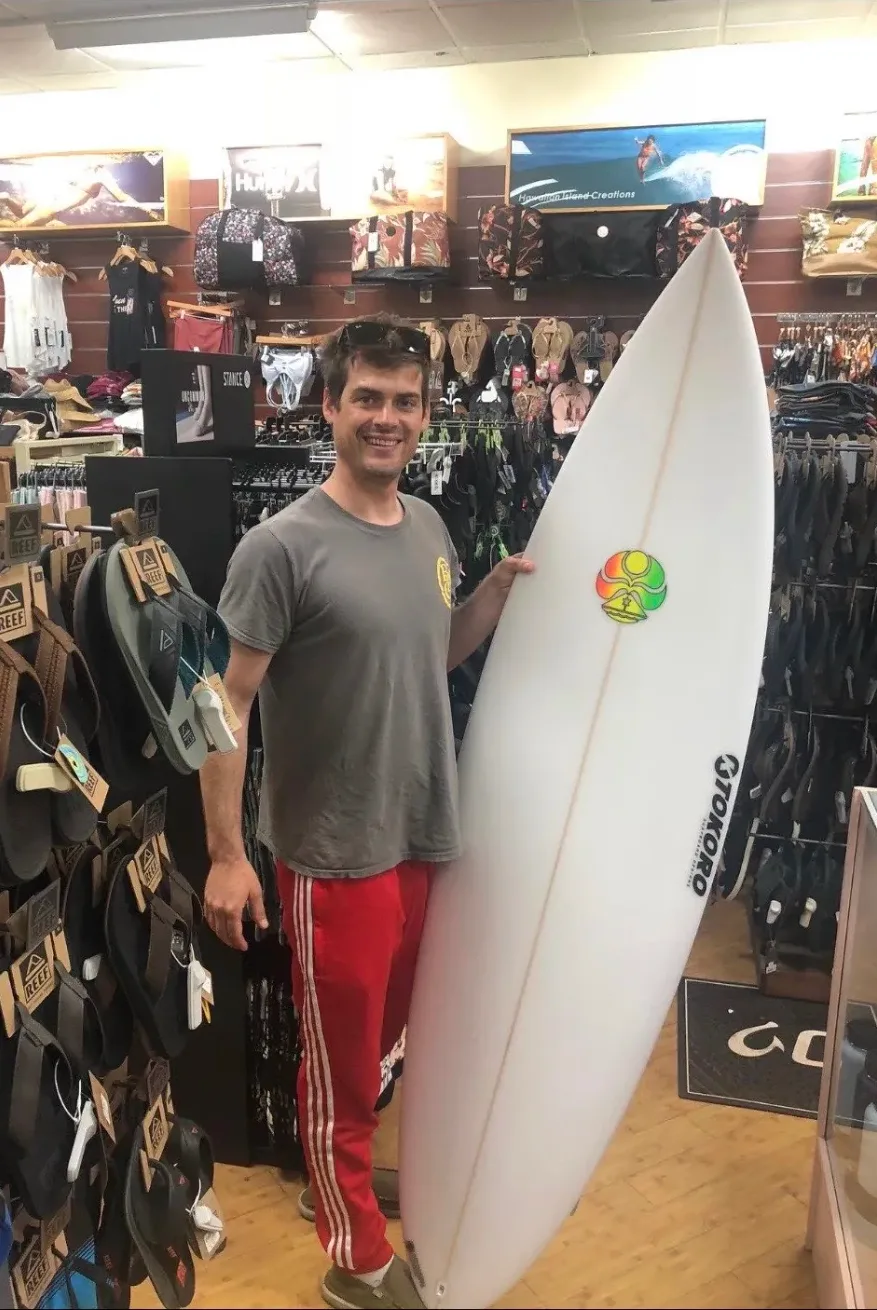
The board is here because I surf, and because the ocean shows up in a surprising amount of my professional work.
Why it's here
Living on Oʻahu means the water is a few minutes away in almost any direction, and surfing is the part of the week that has nothing to do with a screen. It's also the reason a lot of the rest of this room exists.
I'm PADI scuba certified, and I hold a Marine Science Technology certificate in Aquaculture and Aquarium Science from Saddleback College, which is a strange thing to find on a Unity developer's résumé until you see what it led to. It's why I spent nearly three years as lead electronics engineer on a self-charging underwater research ROV, and why my first VR project was a game about kelp forests collapsing rather than something with spaceships in it.
Being in the water regularly is also the best possible calibration for VR. You learn very quickly what real presence feels like, the scale and motion and weight of things, and how much of it a headset is still faking.
Outcome
Surf, dive, print, solder, ship. The ocean keeps ending up in the work, and I've stopped fighting it.
Because I live in Hawaiʻi, and that is not incidental to any of this.
Why it's here
I came to Oʻahu for a computer science degree at the University of Hawaiʻi at Mānoa and never left. Half the work in this room has the islands underneath it somewhere. The weather light panels exist because the LAVA lab has no windows and we kept walking out into rain we did not know about. The garden shed I photogrammetried is in Kapiʻolani Park. The kelp forest game came out of caring about what is happening in the water. The Splat! projection game was built with the Create(X) space at UH West Oʻahu.
A lei is given, not bought for yourself. It marks an arrival, a graduation, a goodbye. My Mānoa degree came with one.
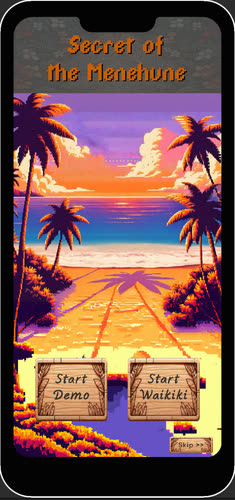
Secret of the Menehune
Secret of the Menehune
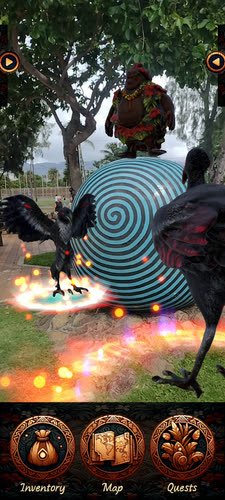
The clearest case of the islands showing up in the work is a location-based AR game I built for a Niantic hackathon, set along the South Shore of Oʻahu.
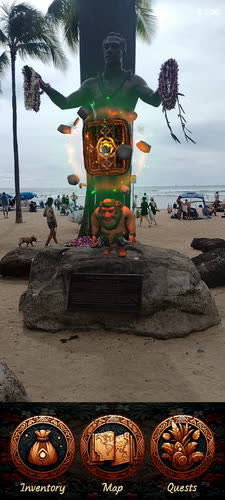
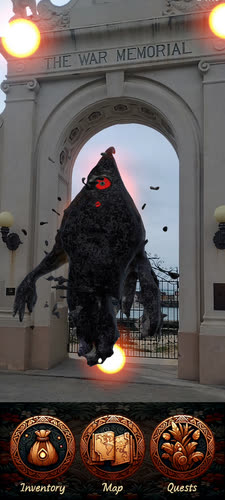
In Hawaiian tradition the Menehune are the islands' small people, builders who work overnight. The premise borrows them as guardians: invasive species are spreading, and you are recruited to push them back with the power of nature. The quests are anchored to real Waikīkī landmarks. You walk to the Duke Kahanamoku statue and there is something waiting at its base. You reach the arch of the Natatorium war memorial and something is standing in it.
A quest anchored to the Duke Kahanamoku statueSomething waiting in the arch of the Natatorium
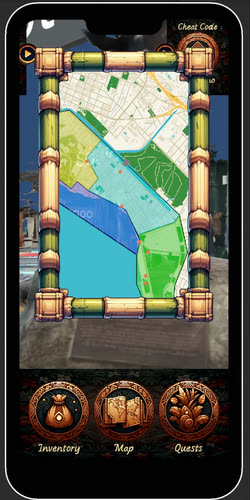
Underneath it is Niantic Lightship ARDK 3.0 with Niantic Maps. The map data is what makes the geofencing work: quests are pinned to real coordinates and real zones rather than to whatever flat surface the phone happens to find, so the game knows the difference between the beach, the park and the road. That was the thing I wanted to prove. A narrative AR experience tied to a place can be authored quickly, and the same structure carries a scavenger hunt, a walking tour or a museum trail just as well.
Geofenced quest zones drawn from Niantic MapsInvasive species, rendered into the real park
It is playable on itch.io, where it has earned a grand total of two dollars. I am at peace with this.
Outcome
I am not from here, and I try to hold that lightly: learn the place names properly, respect the ocean, take care of what is shared. Aloha is a standard of behavior more than a greeting, and it is a good one to build things by.
Mahalo for looking around the room. If you want the words without the 3D, there is a text version of everything here, and if you want to talk, my email is on the desk.